


OneStream Employee
March 4, 2022
Solved

"ColumnDisplayType" parameter in Column Format (SQL Table Editor)

  • March 4, 2022
  • 2 replies
  • 0 views

Hi,

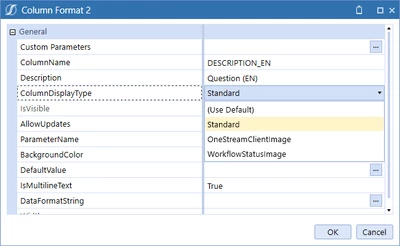
Does anybody know what is the "ColumnDisplayType" parameter under the Column Format, part of the SQL Table Editor ?

I am keen to know how to use it, as I can't find any information on this.

Screenshot of the mentioned field below :
Sergey_0-1646398864024.png


Regards,


Best answer by ckattookaran

So if you got a column with values that are related to Workflow status like Completed, In Progress, Not Started, then those will now show up as the workflow images.

I've not really played around with the OneStream client images, so can't say for sure what the values are.

2 replies

Veteran
March 4, 2022


Hi Sergey!

Column Display Type
Standard
This displays the default data in the column.
OneStreamClientImage
This replaces the data in the column with the associated image.
WorkflowStatusImage
This replaces the data in the column with the associated Workflow status indicator image.

Please send a Kudo if it helps 🙂

SergeyOneStream EmployeeAuthor
OneStream Employee
March 7, 2022

Hi Nicolas, that's what written in the documentation but obviously that's not helping me 🤣

In any case I'll give kudos for this 😄

Veteran
March 7, 2022

Sorry to hear that Sergey, as you wrote you could not find any information. I presume OS has to update the documentation then.

Newcomer
March 4, 2022

So if you got a column with values that are related to Workflow status like Completed, In Progress, Not Started, then those will now show up as the workflow images.

I've not really played around with the OneStream client images, so can't say for sure what the values are.