Solved
Changing default font in Quickview POV
Is there a way to change the color font in the Quickview POV pane? User is saying the grey font in column/row dimensions is too faint to read, see below screenshot:
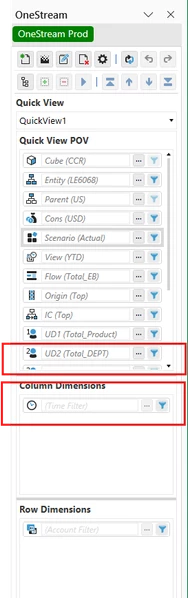

Is there a way to change the color font in the Quickview POV pane? User is saying the grey font in column/row dimensions is too faint to read, see below screenshot:
Unfortunately, there is not a way to change this font color currently for the Dimension Filters on the Rows and Columns. I would recommend entering this into IdeaStream as an enhancement for the OneStream Platform to allow the community to vote on this for a future release
Enter your E-mail address. We'll send you an e-mail with instructions to reset your password.