Member
February 6, 2025

Change Variables

  • February 6, 2025
  • 1 reply
  • 0 views

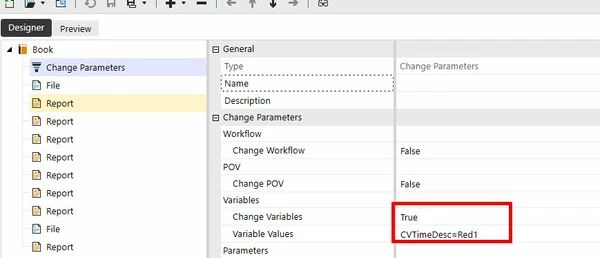
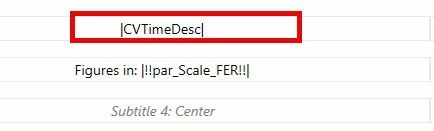
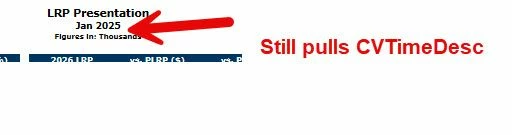
Has anyone had success with the change parameters (Variables)?  I have several reports that all have a simple substitution variable |CVTimeDesc|.  When running the book, I would like to change that Variable to predefined text, however, this doesn't seem to be working.
 

1 reply

Newcomer
February 7, 2025

If your question is how to change the value of |CVTimeDesc| to something custom, I don't believe you can.  CVTimeDesc is a substitution variable controlled by the system.  Any variable enclosed in "|" only is a substitution variable.

Custom parameters are typically enclosed in "|!" which are usually defined through parameters under Workspaces.

Hope that helps?


Cheers,

A.

Member
February 7, 2025

Hey Alex,

Thanks for the response.  I do understand the difference between variables and parameters.  I'm struggling with using the change parameter function in the report book itself.  I want to change the variable to something different at run-time.

Are there variables and substitution variables different?  If we are unable to change, then why does the application have a "change parameter - variable" section is in book?  I assumed it would work the same as Parameters, where I can define an answer, but its not working.

Sean

Newcomer
February 7, 2025

Hey Sean, here’s an example from my book that might help clarify things: In the Change Parameter, I'm adding a Loop1Variable.


In my loop, I define a process where a specific number of Projects are returned. For each project, I run a set of reports, with each report using the current project (from the loop) to generate different results.

In your case, it seems like you don’t need a loop. Instead, you just need a custom variable (create that in the dashboard as a member list). This will prompt for the specific information you want in each interaction.