
Newcomer
January 25, 2023

BI Viewer - Font Sizes

  • January 25, 2023
  • 4 replies
  • 0 views

Hello,

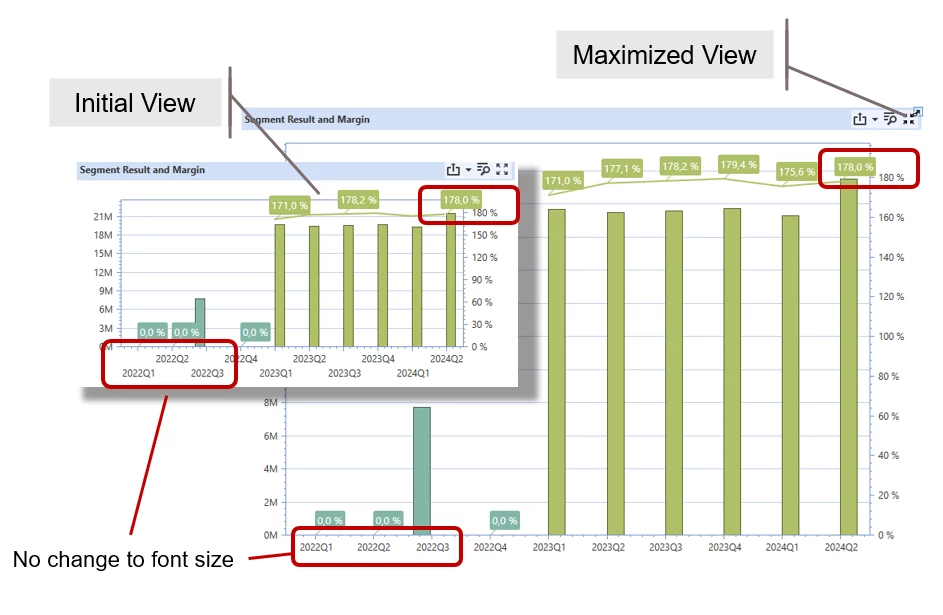
We have a use case that makes extensive use of dashboards. The BI viewer component seems like an attractive solution for this. However, we have been struggling to fully adapt it to our needs. One problem is the (seemingly) fixed font size for table content and axes.

A particularly surprising effect is that there is no change in font size when maximizing a specific component. This could be a very smart feature, e.g. during a beamer presentation. Unfortunately it only increases the white spaces, while the fonts are identical. This seems almost like a bug - or am I missing something? (screenshots are original scale!)

Thanks, Frank.
Federmann_0-1674654659006.png


4 replies

OneStream Employee
January 25, 2023

Hey Frank,

the component reacts to the zooming feature, dragging that little blue slider on the bar:

JackLacava_0-1674661117332.png

That might be too much for your needs; unfortunately there isn't yet an option to manipulate font size on BIViewer components.

FedermannAuthor
Newcomer
January 27, 2023

Hi Jack,

Thanks, I did know about the zoom slider, but this does not give me the sort of control that I need.

  • Obviously it acts on all elements and not only those I consider too small
  • I have no control over the user action (is there a way to set a defined zoom level with a BR?)
  • It destroys the overall layout when I watch a dashboard at e.g. 160%
  • The zoom slider is not even available when a new dashboard opens (I believe)

It feels like there is really functionality missing here and I will resubmit my question to the Ideastream, as suggested by Sam.

OneStream Employee
January 25, 2023

Hey Frank, 

I think this would be a good idea to put on Ideastream as I could see this being useful to a lot of people.

Thanks,

Sam

Contributor
February 2, 2023

Been trying to change the font on cards too with no success. Did you post it on IdeaStream?

FedermannAuthor
Newcomer
February 3, 2023
OneStream Employee
February 2, 2023

The only place you can change font (size, colors, bold, italic ...) as of 7.3.1 is on the text fields components only...

Contributor
February 2, 2023

Thanks Sergey, i am in 7.1.3. Will try.