Newcomer
July 7, 2022
Solved

Audit Cube View column/row sharing

  • July 7, 2022
  • 2 replies
  • 0 views

Hi,

Is there a way to audit (in a report...) for all cube views, which one refers to a column or row cube view template ? 
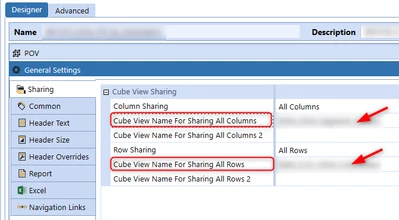
Harry_0-1657183981579.png

Harry_0-1657184486383.png


Thanks.


Regards,

Harry

Best answer by EricOsmanski

Hi Harry,

Here is a query you can throw in a Data Adapter and then into a Gird View (or some other component) on a Dashboard to give you a quick look at all the Cube Views in your app and the Column and Row Sharing assignments.

SELECT
Name
,CAST(REPLACE(CAST(CubeViewItem.XmlData AS NVARCHAR(MAX)),'utf-8','utf-16') AS XML).value('(cubeView/cubeViewNameForSharingAllRows)[1]', 'varchar(max)') AS [Cube View Name For Sharing All Rows]
,CAST(REPLACE(CAST(CubeViewItem.XmlData AS NVARCHAR(MAX)),'utf-8','utf-16') AS XML).value('(cubeView/cubeViewNameForSharingAllRows2)[1]', 'varchar(max)') AS [Cube View Name For Sharing All Rows 2]
,CAST(REPLACE(CAST(CubeViewItem.XmlData AS NVARCHAR(MAX)),'utf-8','utf-16') AS XML).value('(cubeView/cubeViewNameForSharingAllCols)[1]', 'varchar(max)') AS [Cube View Name For Sharing All Columns]
,CAST(REPLACE(CAST(CubeViewItem.XmlData AS NVARCHAR(MAX)),'utf-8','utf-16') AS XML).value('(cubeView/cubeViewNameForSharingAllCols2)[1]', 'varchar(max)') AS [Cube View Name For Sharing All Columns 2]
FROM CubeViewItem

2 replies

Veteran
July 7, 2022

Hi Harry,
The first property you are mentioning is to share columns or rows coming from other cube views. In other words, it is a kind of template to create cube views rows or columns. Then you can open the Object Lookup, and begin typing the desired Cube View Template name, select the Cube View Template, and click Copy to Clipboard. (see design guide page 749).
Hope it helps,
Nic

HarryAuthor
Newcomer
July 7, 2022

Thanks Nicolas, we are accustomed to create row/column cube views templates to reuse them in cube views...and check where a template is shared... but I was wondering if there was a way to have a comprehensive view that would display in a report all the cube views with a shared row/column template.

Thanks,

Harry

Veteran
July 7, 2022

Thanks for the feedback Harry! 

OneStream Employee
July 7, 2022

Hi Harry,

Here is a query you can throw in a Data Adapter and then into a Gird View (or some other component) on a Dashboard to give you a quick look at all the Cube Views in your app and the Column and Row Sharing assignments.

SELECT
Name
,CAST(REPLACE(CAST(CubeViewItem.XmlData AS NVARCHAR(MAX)),'utf-8','utf-16') AS XML).value('(cubeView/cubeViewNameForSharingAllRows)[1]', 'varchar(max)') AS [Cube View Name For Sharing All Rows]
,CAST(REPLACE(CAST(CubeViewItem.XmlData AS NVARCHAR(MAX)),'utf-8','utf-16') AS XML).value('(cubeView/cubeViewNameForSharingAllRows2)[1]', 'varchar(max)') AS [Cube View Name For Sharing All Rows 2]
,CAST(REPLACE(CAST(CubeViewItem.XmlData AS NVARCHAR(MAX)),'utf-8','utf-16') AS XML).value('(cubeView/cubeViewNameForSharingAllCols)[1]', 'varchar(max)') AS [Cube View Name For Sharing All Columns]
,CAST(REPLACE(CAST(CubeViewItem.XmlData AS NVARCHAR(MAX)),'utf-8','utf-16') AS XML).value('(cubeView/cubeViewNameForSharingAllCols2)[1]', 'varchar(max)') AS [Cube View Name For Sharing All Columns 2]
FROM CubeViewItem

HarryAuthor
Newcomer
July 7, 2022

Thank you so much much for sharing Eric .

Regards,

Harry

