
Newcomer
September 26, 2022

Adding % to Cube View Column

  • September 26, 2022
  • 3 replies
  • 0 views

In the below screenshot, I want to add % (beside the numbers) to the utilization % but whenever I try to add % using cube view formatting, it adds % to all of the four columns. Is there any specific way I can just add % to just utilization %.

Note: CM and YTD are two columns. Hours and Utilization are levels which fall under these two columns (CM & YTD)
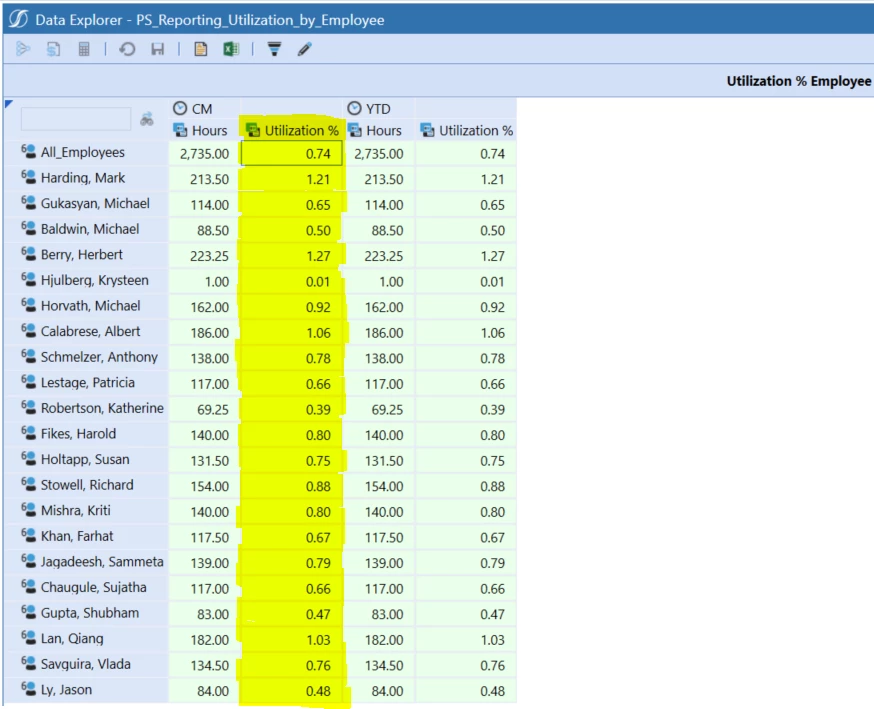
 

Screenshot -1.PNG

    3 replies

    Newcomer
    September 27, 2022

    Try this conditional format

    If (ColE2HeaderDisplayText = 'Utilization %') Then
        ShowPercentSign = True
    End If


    Veteran
    September 27, 2022

    Fuad95  can you show us where you add the formating? And the columns of your cube view in your designer?

    Expert
    September 27, 2022

    This should be in your Cell Formatting.

    Newcomer
    September 27, 2022

    I would suggest breaking the expansion so that you have 4 columns to apply individual column formatting. That's probably the easiest method. You could achieve it with conditional formatting as mentioned previously.