Adding spacing within a dashboard - how?
Hi all,
Trying to figure out how to position a component in a particular column (or give the appearance of that)
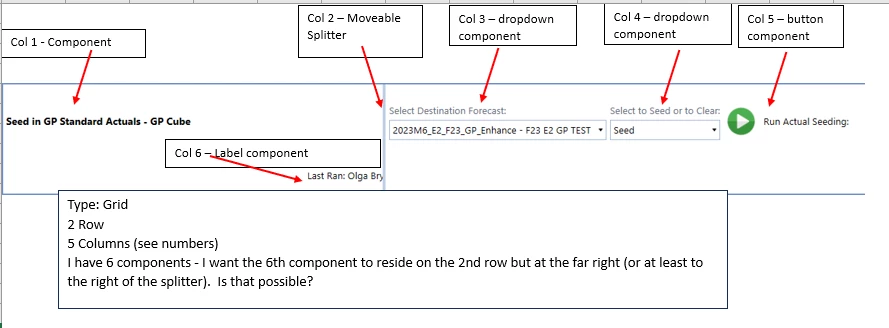
It's a grid type and has 5 columns, 2 rows and 6 components (previously 6 columns, 1 row and 6 components but it's too wide for the screen that way)
My hope was to put the 6th component on the far right of the dashboard (or at least to the right of the splitter) in a 2nd row. There's no way in a Grid type dashboard that I can see where you can force a component to use a particular column, or is there and I just missed it?
I've tried adding big margins to force it right but that doesn't work either.
I'm thinking either this is not possible in a single dashboard and I will have to create a new 1 row dashboard to put that label component in. But I would sure love to hear any ideas. It feels like this should definitely be doable but I'm stumped.
I'm adding a diagram for better understanding of what I'm trying to accomplish
Much thanks in advance for any suggestions.