



Find Training Faster: Navigator Search Is Now Live in the OneStream Community
We're excited to announce that you can now search the OneStream Navigator training library directly from the OneStream Community. No more jumping between tabs or trying to remember where a particular course lives — everything is now just a search away, right where you already come to connect, ask questions, and learn from your peers.
One search bar, twice the answers
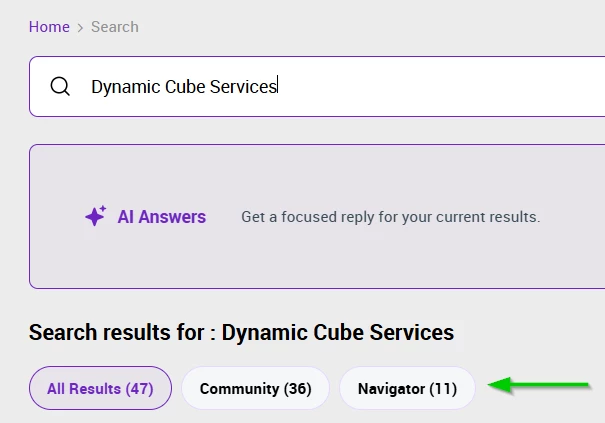
Until now, finding the right learning content meant leaving the Community and heading somewhere else to dig through the catalog. That extra step is gone. When you run a search in the Community, your results now include both Community content and Navigator training content side by side.
You'll see a Navigator tab appear alongside your other search results. Click it to filter down to just the training content, or browse everything together to see the full picture. Whether the best answer is a peer's discussion thread or a structured course, you'll find it in one place.
Straight to the course with one click
Search results don't just tell you that a course exists — they take you right to it. Every Navigator result links directly to the course, so you can go from "I need to learn this" to actually starting the training in a single click. No hunting through the catalog, no copying titles into another search box. See it, click it, start learning.
This is especially handy when you're already deep in a Community conversation. If someone references a topic you want to build your skills on, the relevant training is right there in your search results, ready to open.
A quick note on signing in
When you click through to a Navigator course, you'll be taken into the Navigator training platform. If you're not already signed in there, you'll simply be prompted to log in before the course opens. It's a quick step, and once you're signed in you'll go straight to the content you selected. If you're already signed in to Navigator, you'll land on the course right away.
Why this matters
Bringing training into Community search is about removing friction from your learning. A few of the benefits you'll notice right away:
- Everything in one place. Search Community content and the full training library together, without switching platforms.
- Faster answers. The right course surfaces alongside peer discussions, so you can choose whichever format helps you most in the moment.
- One-click access. Results link directly to courses, so there's no extra searching once you've found what you need.
- Learning in context. Discover relevant training exactly when a Community conversation sparks the need for it.
Try it out
Head to the OneStream Community, run a search on any topic you're working through, and look for the Navigator tab in your results. Click into a course, sign in if prompted, and you're on your way.
We'd love to hear what you think — let us know in the comments how the new search is working for you, and what content you'd like to see surface next.