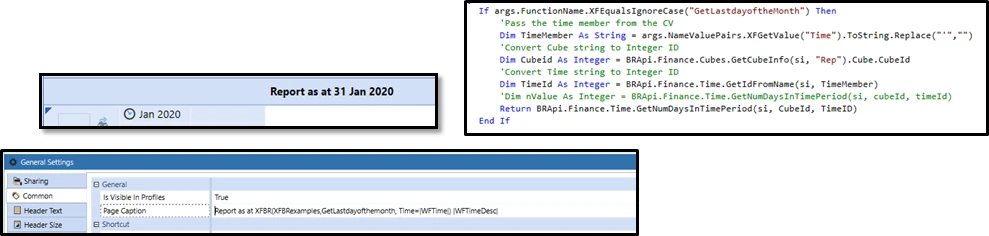
Question: In a Cube View heading, how can I include the last day of the month as the time description in a page caption (e.g., display "as at 30 September 2020" instead of "September 2020“)?
A
Anonymous
Aug 18, 2021 5:18 PM UTC
Question: In a Cube View heading, how can I include the last day of the month as the time description in a page caption (e.g., display "as at 30 September 2020" instead of "September 2020“)?
Assuming that the date being shown is always the last day of the month and the client is using calendar months, it is possible to use XFBR string rule to call a function to get the number of days in the month.
Write a Dashboard XFBR String Business Rule to calculate the last day of the month based on the context.
Sample (without parameters):
Namespace OneStream.BusinessRule.DashboardStringFunction.CV_HeaderDate
    Public Class MainClass
        Public Function Main(ByVal si As SessionInfo, ByVal globals As BRGlobals, ByVal api As Object, ByVal args As DashboardStringFunctionArgs) As Object
            Try
                If args.FunctionName.Equals("GetLastDayOfMonth", StringComparison.InvariantCultureIgnoreCase) Then
                    ' Get the current year and month from the context
                    Dim year As Integer = DateTime.Now.Year
                    Dim month As Integer = DateTime.Now.Month

                    ' Calculate the last day of the month
                    Dim lastDay As DateTime = New DateTime(year, month, DateTime.DaysInMonth(year, month))

                    ' Return the formatted string
                    Return "as at " & lastDay.ToString("dd MMMM yyyy")
                End If
                Return Nothing
            Catch ex As Exception
                Throw ErrorHandler.LogWrite(si, New XFException(si, ex))
            End Try
        End Function
    End Class
End Namespace
Sample (if the date is based on a parameter [period]):
Namespace OneStream.BusinessRule.DashboardStringFunction.CV_HeaderDate
    Public Class MainClass
        Public Function Main(ByVal si As SessionInfo, ByVal globals As BRGlobals, ByVal api As Object, ByVal args As DashboardStringFunctionArgs) As Object
            Try
                If args.FunctionName.Equals("GetLastDayOfMonth", StringComparison.InvariantCultureIgnoreCase) Then

				Dim inputTime As Member = brapi.Finance.Members.GetMember(si, Dimtypeid.Time, args.NameValuePairs("Param_SelectMonth"))

				' Get the current year and month from the context
                    Dim year As Integer = BRApi.Finance.Time.GetYearFromId(si,inputTime.MemberId)
                    Dim month As Integer = BRApi.Finance.Time.GetPeriodNumFromId(si,inputTime.MemberId)

                    ' Calculate the last day of the month
                    Dim lastDay As DateTime = New DateTime(year, month, DateTime.DaysInMonth(year, month))

                    ' Return the formatted string
                    Return "as at" & lastDay.ToString("dd MMMM yyyy")
                End If
                Return Nothing
            Catch ex As Exception
                Throw ErrorHandler.LogWrite(si, New XFException(si, ex))
            End Try
        End Function
    End Class
End Namespace
Set the Cube View Header/Caption
Use the syntax: XFBR([Name of Business Rule], GetLastDayOfMonth)
If there is a time parameter in the Cube View POV, add "[Name of Parameter] = [|!Name of Parameter!|]" after "GetLastDayOfMonth" to ensure the parameter is passed correctly.
Full example call of XFBR: XFBR(CV_HeaderDate, GetLastDayOfMonth, Param_SelectMonth = |!Param_SelectMonth!|)