



Your Profile, Account and Notifications
Accessing your Community profile
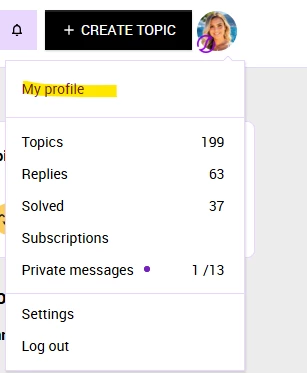
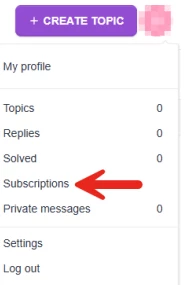
Your Community profile page is where you can view your bio and badges, update your profile information, and see your community contributions. To access it, click your avatar image in the top right corner of any page and select My profile from the drop-down menu.
Editing your profile
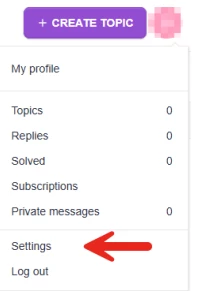
From your profile page, click My settings to update your display name, bio, profile photo, and other personal details. Save your changes when done.
Viewing your contributions
Your profile page shows a history of your community activity, including topics posted, replies made, and likes given or received. This is a convenient way to find your past posts or track your engagement over time.
Your badges and rank
Badges and rank earned through your community participation are displayed on your profile page. See the Understanding Community Ranks and Badges article for more information.
Subscriptions
Subscriptions ensure you receive automated email notifications about the most recent posts and replies. You have full control over what you subscribe to and can manage your preferences at any time.
Subscribing to a board
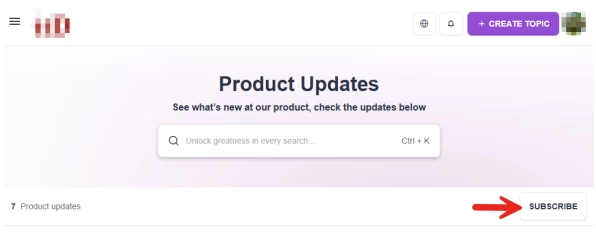
Navigate to a forum board and select Subscribe to receive email notifications whenever a new topic is posted to that board.
Subscribing to a topic
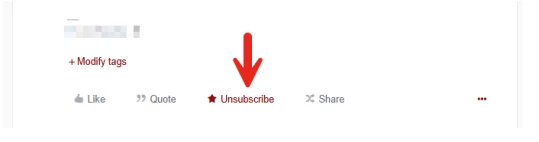
Open a thread and click Subscribe to receive notifications when new replies are added. To unsubscribe, click the Subscribed button on the topic.
Managing your notification preferences
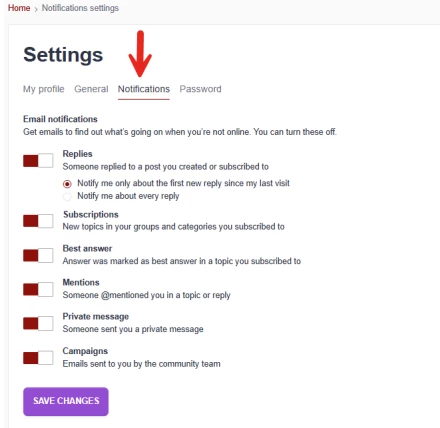
You can manage all subscription and notification preferences from My settings in your profile. Adjust the frequency and types of notifications you receive from there.
Platform Migration
The OneStream Community migrated on June 29, 2026. Existing accounts carried over automatically. The following data transferred to the new platform: your username, email address, community activity (posts, replies, likes), and your community role (Customer, Partner, or Employee). Ranks and badges are all new with the migration.
Please note that the following did NOT transfer to the new platform: your profile picture, subscriptions, and personal settings. You will have the opportunity to update your profile and re-configure your notification preferences after the new community launches.
Changing jobs and/or email addresses
If you have a new email address, contact us via Service Now ticket to update your existing account with your new email.
Logging in to the Community
To log in, click Sign In in the top right corner of any page. The OneStream Community uses Single Sign-On (SSO) via OKTA. Once you have access to OKTA, click on the Community app and log in. If you are registering for the first time, click on the app and follow the prompts to choose a username. You cannot login to the community without an OKTA account.
Login issues
If you cannot log in, confirm you are using the correct credentials for your OKTA account, clear your browser cache and cookies, or try a different browser or incognito window. If the issue persists, contact your internal IT administrator, as SSO credentials are managed by your organization through OKTA, not by the Community platform.
If the issue cannot be resolved through the above steps, submit a support ticket in Service Now. Login and access issues tied to OKTA are managed at the organizational level and may require IT involvement.
Resetting your password
Because the OneStream Community uses OKTA SSO, your password is managed through OKTA and not the Community platform directly. To reset your password, go to your organization's OKTA login page and use the Forgot password option there, or contact your internal IT administrator for assistance.
Closing your account
Account closure is permanent and cannot be undone. To proceed, please submit a ticket in Service Now. Past posts will appear as guest or anonymous, and badges and rank will not transfer to a new account.