



Understanding Community Ranks and Badges
What are Community ranks?
The Community uses a ranking system that consists of earned ranks and assigned ranks. The earned ranking ladder encourages and recognizes quality contributions to the community, whereas assigned ranks sit outside the earned ranking ladder and are given based on a specific role in the community, such as a Community Manager.
Community members can reach higher earned ranks by contributing and participating in the Community. For example, by creating new topics, receiving likes, or authoring accepted solutions.
Community ranks are one way of showing that you are especially passionate, knowledgeable, and helpful.
Having a high rank can help establish you as a leader, give you more visibility, and even open up exclusive opportunities.
Where can I see someone's rank?
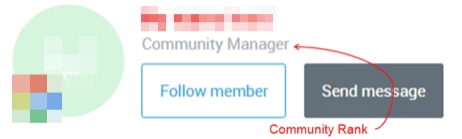
A member's Community rank is shown throughout the Community - on your profile page, as you interact in the forums, and on leaderboards.
What are avatar icons?
While all Community members have a rank (either earned or assigned), you'll see that some members also have an avatar icon to signify a unique status, role, or achievement in the broader OneStream Community ecosystem.
Community members who are employees (assigned rank, "Staff") have an avatar icon. This is so all Community members can more quickly and easily recognize who is or who is not a OneStream employee.
What are Community badges?
Badges recognize you for your contributions and accomplishments in the Community (e.g. posting, commenting, authoring solutions) without being tied to a rank.
Badges are unlocked by completing a certain amount of activities or manually assigned when certain criteria are met, whereas ranks are tied to completing a combination of activities and accomplishments.
To view the badges you've earned, click on your avatar on the top right corner and select "My profile".
On your profile page, you can see a high-level overview of badges you've earned, including the most recent.