Member
September 17, 2026
Solved

What is the best practice of "nested" dynamic dashboards

  • September 17, 2026
  • 3 replies
  • 67 views

Hi all, 

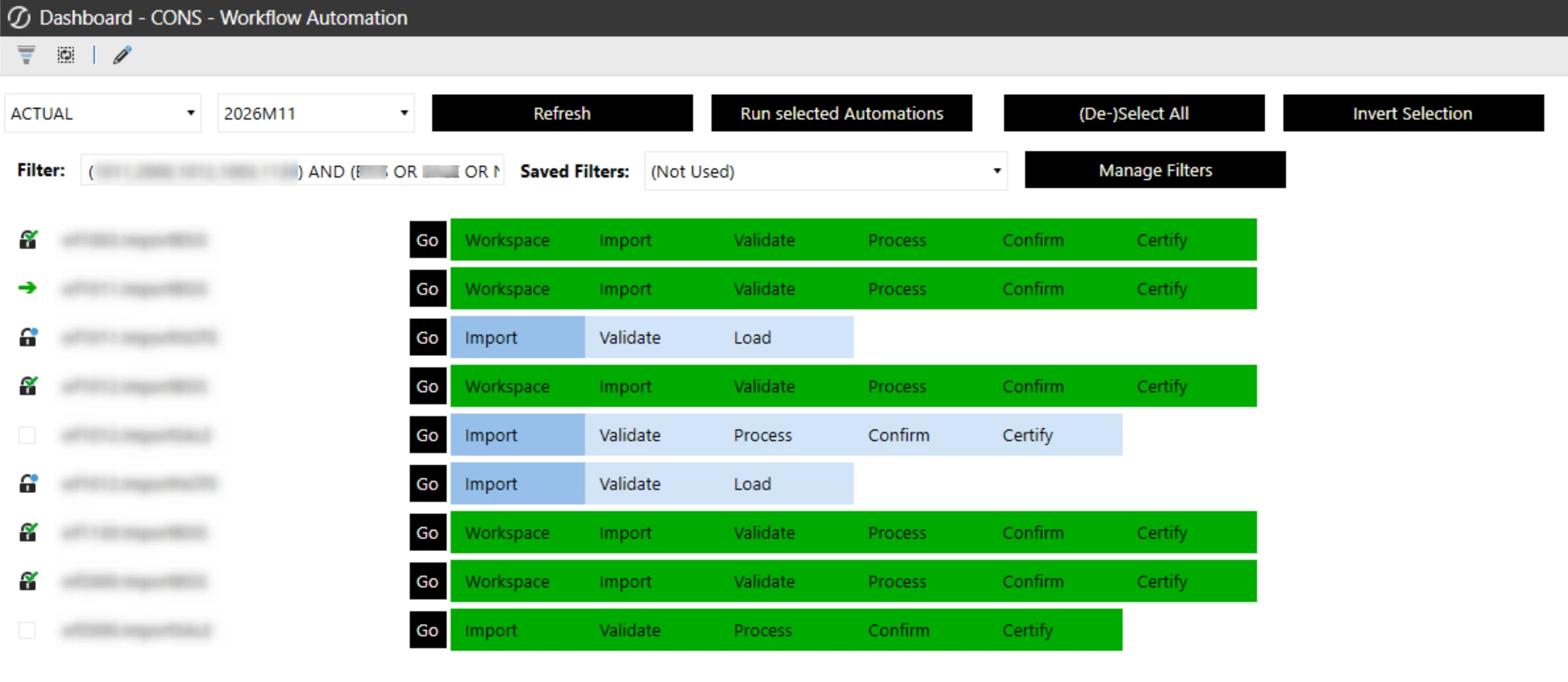
I would be interested in the best practice of nested dynamic dashboards, e.g. imagine, you want to create a dashboard, that allows you to dynamically list the Workflows a user has access to with the steps in the workflow and the current status. We’ve build something like this (see screenshot), but we aren’t sure, whether it is the best/recommended approach from the performance perspective.

Would be nice if you could elaborate on this a bit.


Thanks

Markus

Best answer by JackLacava


Transcript

Markus asked for best practices related to nested dynamic dashboards, and he sends in even a screenshot of a dashboard is pretty cool. So that's a cool dashboard, I like that. Generally speaking, nesting is absolutely fine in moderation. The main elements to keep in mind from a performance perspective for dashboards, for dynamic dashboards are save as little state as possible for each component, reuse button IDs, and generally speaking, component IDs as much as possible.

Right. And don't go overboard in the number of components in the entire page, because the same sort of slowdowns that you get in regular dashboards, if you put thousands of components on the page, it will have them in dynamic dashboards, exactly the same. So but beyond that, there isn't much more that I can suggest. However, for details about making dynamic dashboards performant in particular, there is one page called Dynamic Dashboard Management in the documentation.

So search for dynamic dashboard management and have a look. And you have very practical advice there to keep your dynamic dashboard performant. We also have some improvements in this particular area coming very very soon. So hopefully things will look even nicer going forward.

So thanks, Markus.

3 replies

Member
September 21, 2026

Overall the dashboard allows to select and run multiple Workflows in one go. So the user doesn’t have to go to each individual workflow and start it and run step by step. The workflows run up to Certify usually excluding this step, so users have to manually go in and certify that all data is fine. You can see whether WF is running (arrow) or locked or available for selection. On success or failure the user triggering the WF gets an email notification.

Sage
September 22, 2026


Transcript

Markus asked for best practices related to nested dynamic dashboards, and he sends in even a screenshot of a dashboard is pretty cool. So that's a cool dashboard, I like that. Generally speaking, nesting is absolutely fine in moderation. The main elements to keep in mind from a performance perspective for dashboards, for dynamic dashboards are save as little state as possible for each component, reuse button IDs, and generally speaking, component IDs as much as possible.

Right. And don't go overboard in the number of components in the entire page, because the same sort of slowdowns that you get in regular dashboards, if you put thousands of components on the page, it will have them in dynamic dashboards, exactly the same. So but beyond that, there isn't much more that I can suggest. However, for details about making dynamic dashboards performant in particular, there is one page called Dynamic Dashboard Management in the documentation.

So search for dynamic dashboard management and have a look. And you have very practical advice there to keep your dynamic dashboard performant. We also have some improvements in this particular area coming very very soon. So hopefully things will look even nicer going forward.

So thanks, Markus.
Member
September 24, 2026

Thanks Jack, very useful information. I will check, whether we follow all the topics and additional information you mentioned.