
Newcomer
May 26, 2022
Solved

Windows shortcut on OneStream application

  • May 26, 2022
  • 3 replies
  • 0 views

Hello Team,

We have IE and Edge browser on the system. Once opened the OneStream application when we do Windows shortcut as per below screenshot it is creating the Windows short cut on the desktop.

And, then when we open the OneStream application using the shortcut , it is opening on IE browser.

How to create a shortcut for Edge and the application should open on Edge Browser when we use the shortcut.
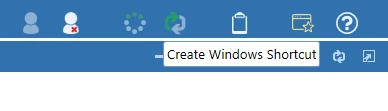
Praveen_0-1653585589132.png

Thank you,

Praveen

Best answer by Sue_T

Hi Praveen,

I had the same concern, and i found the steps in this KB will work. https://onestreamsoftware.service-now.com/sp_cloud?id=kb_article_view&sysparm_article=KB0011880

Basically, you edit the shortcut so that it uses Edge instead of IE. Tip: You may have a different path to the msedge.exe file, so check on that before you edit the shortcut.

I noticed that after we upgraded to v7.0, the shortcut is not dependent on a browser, so we probably won't have this issue going forward. (The new shortcut uses PresentationHost.exe)

3 replies

Sue_TAnswer
Newcomer
May 26, 2022

Hi Praveen,

I had the same concern, and i found the steps in this KB will work. https://onestreamsoftware.service-now.com/sp_cloud?id=kb_article_view&sysparm_article=KB0011880

Basically, you edit the shortcut so that it uses Edge instead of IE. Tip: You may have a different path to the msedge.exe file, so check on that before you edit the shortcut.

I noticed that after we upgraded to v7.0, the shortcut is not dependent on a browser, so we probably won't have this issue going forward. (The new shortcut uses PresentationHost.exe)

PraveenAuthor
Newcomer
May 27, 2022

Thank you Sue_T . Issue resolved.

Newcomer
August 15, 2022

We have noticed in the last few of weeks that when we click the shortcut with the default IE target, we receive a pop-up message that reads "This action is restricted.  For more information, please contact your system administrator." 

csutterfield_0-1660574052142.png

Taking the steps in the https://onestreamsoftware.service-now.com/sp_cloud?id=kb_article_view&sysparm_article=KB0011880 Sue_T provides above prevents this message from popping up, but you still have to click "Open"  on an Edge browser file message.  I played around with Edge settings (site permissions, etc.) for a few minutes but didn't find anything that prevented that message from appearing.

csutterfield_2-1660575535838.png

This is a better experience than receiving the error message, but will it go away once we upgrade to 7.0?

Thanks,

Candice

Newcomer
August 15, 2022

Hi Candice,

Yes, it will go away. 🙂 The shortcut that uses Presentation Host does not even launch the browser, so it is much more convenient. The user won't be prompted to open the file, and it doesn't leave a browser window/tab open.

Best,

Sue

Newcomer
August 15, 2022

Thanks Sue, Good to know and appreciate your quick response.

I think we'll probably try to do that upgrade sooner than later to avoid our users having to take the extra steps!  😉