
Contributor
January 27, 2022

SQL Table Editor connecting to External Database not working

  • January 27, 2022
  • 4 replies
  • 0 views

Hi,

Can anyone explain why External connection is not working in SQL Table Editor ? The same connection is working for Data Adapter.

Screenshot for Data Adapter and it’s working.
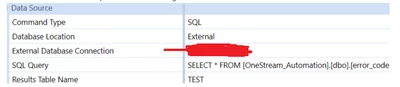
sridharm92_2-1643313884529.png


Screenshot for SQL Table Editor and it’s not working.
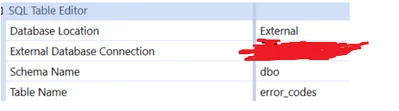
 

sridharm92_3-1643316267317.png


I tried giving the schema name as well but no luck. We are on version 6.4.

Thanks
Sri

4 replies

Veteran
January 28, 2022

Hi there,

Did you try to put the column format like this ?

NicolasArgente_0-1643355139607.png


Sridhar_MAuthor
Contributor
January 28, 2022

Hi Nicolas, 

column format is not required to test the connection. So I didn't include. 

Newcomer
January 28, 2022

I think the problem is the SQL Table Editor doesn't know what the database is but in your SQL Query for the data adapter you're using the fully qualified name ([dbname.schemaname.tablename]) assuming OneStream_Automation is your database name. It might be the db connection is set up only to the server. Check with your OneStream support and they will help you out.

Veteran
January 28, 2022

OR check your SQL statement directly into a data adaptor 

Newcomer
January 28, 2022

Keep in mind that the editor and data adapter works differently. Also, is the user that you are using in the external connection does that user got write access to the tables?

Sridhar_MAuthor
Contributor
January 28, 2022

Yes, that user has write access. 

Newcomer
January 28, 2022

What is the error you are getting then? Prior releases won't let you write to a different schema. But I guess you are not on that version.