
Contributor
October 19, 2024

Spreadsheet rule in Workspace Assembly - Dont seem to be able to add it in Spreadsheet

  • October 19, 2024
  • 1 reply
  • 0 views

Dear Community Members,
I have a spreadsheet rule in my own workspace assembly.
The workspace is set to 'shareable'.

WernerN_0-1729298248370.png

But the BR does not show up when i try to add in Table View Definition
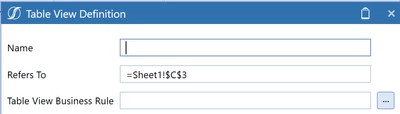
WernerN_1-1729298297427.pngWernerN_2-1729298317512.pngWernerN_3-1729298324087.png

When i define a rule outside of my Workspace in the regular Business Rule section my spreadsheet rule shows up.
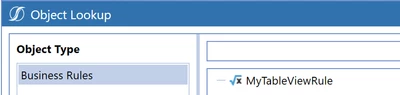
WernerN_4-1729298426719.png

Did I miss a setting somewhere to tell Spreadsheet to look into Workspaces?

Thanks in advance


1 reply

Newcomer
October 21, 2024

Hi,

I think the object lookup BR list only shows the BR from the 'Application' type Business Rules.

Can you try adding the BR without using the object lookup?

This should be the syntax: Workspace.WorkspaceName.AssemblyName.FileName

Thanks,

Ioana

WernerNAuthor
Contributor
October 21, 2024

Thank you for your response Ioana,
Did not work thought.  I tried in the Spreedsheet function in OneStream and in Excel.
Tried BR name with and without .vb suffix.  OneStream accepts input, no error, but alas also no tableview.
WernerN_0-1729522357423.png
 

Newcomer
October 21, 2024

Try replacing 'Current' with the actual workspace name. No .vb suffix is needed. In the OS documentation, this is the syntax: 

Ioana_1-1729527293169.png

