
Newcomer
September 25, 2024

SIC Online or Offline?

  • September 25, 2024
  • 7 replies
  • 0 views

Hello,
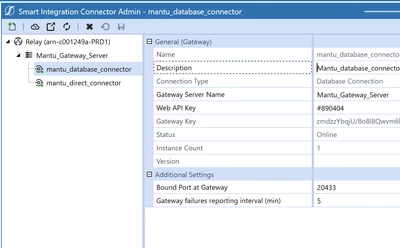
i've installed the SIC and it's Online in the "smart integration connector part" as you can see:
mtejjini_0-1727249090155.png

in the error log i have this error:
Summary: Smart Integration Connector Gateway Server Heartbeat has timed out for 'mantu_database_connector'. Current timeout: '5'. Last Reported Error Time: '9/25/2024 7:16:56 AM' UTC.

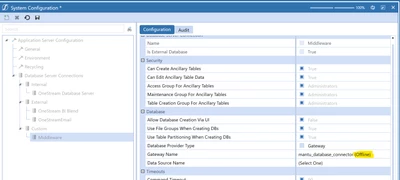
and in the "system configuration part" i have created the a custom database which in i can see that the Mantu_database_connector is offline:
mtejjini_1-1727249247856.png

if anyone knows what's the error and how to solve your help will be much appreciated.
Thanks

7 replies

OneStream Employee
September 26, 2024

This error can stem from a variety of things such as IP Whitelisting, Firewall settings, DNS issues, Proxy usage etc. To get to the bottom of your issue specifically I would suggest you raise a support ticket with our excellent Customer Suppport via Service Now and they will troubleshoot this together with you.

mtejjiniAuthor
Newcomer
September 26, 2024

Thank you Joakim for you answer.
I already created a ticket to the OS Support for this issue, but the response wasn't very helpful.
Still struggling on this for the moment..

mtejjiniAuthor
Newcomer
September 26, 2024

ticket reference:CSRC0106629

OneStream Employee
January 30, 2025

Hopefully you were able to resolve this -- As Joakim suggested, there could be network devices that we've seen that have lower idle timeout thresholds that occasionally interfere.  Also, we have revised some of the connection management in 8.4+ versions that could help here.

Newcomer
February 4, 2025

How was it solved? We are having the exact same issue after moved to 8.4 Cloud.

mtejjiniAuthor
Newcomer
February 4, 2025

Hello,

Make sure that your client is using the same version of the SIC installer as their version of OneStream.
In my case, the client was not using the correct version. We installed the right version of SIC with the client, and it resolved the issue.

mtejjiniAuthor
Newcomer
February 4, 2025

Notice that in my screenshot, the SIC is online, but the version is not mentioned. The issue arises from the missing version information.

Expert
February 4, 2025

Run the below Shell Script in the SIC Server additionally refer the KB0013213 article. It should point to the Public DNS Server. This could be one of the issues. Hope this helps.

https://github.com/Azure/azure-relay-dotnet/blob/dev/tools/GetNamespaceInfo.ps1

Newcomer
February 5, 2025


Newcomer
February 5, 2025


Newcomer
February 5, 2025

Will ask network admin to try the script next.

Newcomer
February 20, 2025

Onestream finally solved it by rebuilding the Azure Relay.  Refer to CSRC0112948 if anyone else has similar problem.