
Newcomer
November 3, 2023
Solved

[QuickView] Cross Time and Scenario Filters

  • November 3, 2023
  • 1 reply
  • 0 views

Hello,

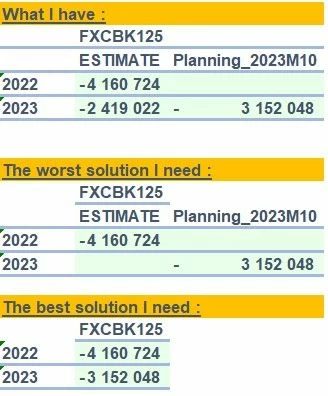
Is it possible on the same quickview to cross both Time and Scenario Filter?

For example I need the cross of  :

Time "2022" with scenario "ESTIMATE"

Time "2023" with scenario "Planning_2023M10"

But I have some datas on 2023 cross ESTIMATE I don't want to see.

Attached what I have and what I need.

Thank you!
 

Quick View.jpg

Best answer by db_pdx

Hi Vincent: I would recommend using an override (we call them 'mashups' internally).  You'll remove the Scenario from your column filter and append it to each specific time period. For example:

T#2022:S#ESTIMATE,
T#2023:S#Planning_2023M10

If you want to make it clear that overrides are applied, use the :Name() function at the end with MemberFilter variables. Example:

T#2022:S#ESTIMATE:Name(|MFTime| |MFScenario|),
T#2023:S#Planning_2023M10:Name(|MFTimeDesc| |MFScenarioDesc|)

1 reply

db_pdxAnswer
Contributor
November 3, 2023

Hi Vincent: I would recommend using an override (we call them 'mashups' internally).  You'll remove the Scenario from your column filter and append it to each specific time period. For example:

T#2022:S#ESTIMATE,
T#2023:S#Planning_2023M10

If you want to make it clear that overrides are applied, use the :Name() function at the end with MemberFilter variables. Example:

T#2022:S#ESTIMATE:Name(|MFTime| |MFScenario|),
T#2023:S#Planning_2023M10:Name(|MFTimeDesc| |MFScenarioDesc|)
VincentAuthor
Newcomer
November 3, 2023

Thanks so much!

The best tip of the year for me and a lot of my colleagues! 

Just the second part takes time to retrieve but it is not a mandatory need.