
Newcomer
Apr 22, 2025 7:52 AM UTC

Quick certification of a Certify Workflow using business rule

Hello everyone,

Is it possible using a business rule to make a quick certification for a Certify Workflow?
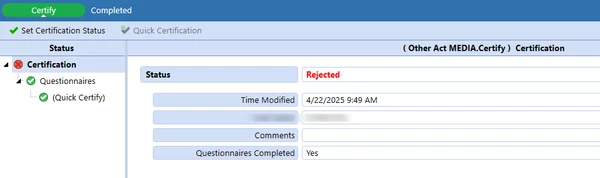
I was abel to complete the Certify Workflow task using business rule but the certification status remains rejected.

Thank you in advance for your help.

Regards,

Antony

12 replies

Member
Aug 15, 2026 1:36 PM UTC

Hi aabirached,

Can you share your portion of code that Certify your workflow?  I had the below code and it’s running forever (end with error).

If isAllWfComplete Then
    'Dim wfParentUnitPk As WorkflowUnitPk = BRApi.Workflow.General.GetWorkflowUnitPk(si, wfProfParent.Name, wfScenario, wfTime)
    Dim wfTopClusterPK As WorkflowUnitClusterPk = BRApi.Workflow.General.GetWorkflowUnitClusterPk(si, wfProfParent.Name, wfScenario, wfTime)
    
    BRApi.Workflow.Status.SetWorkflowStatus(si, wfTopClusterPK, StepClassificationTypes.Certify, WorkflowStatusTypes.Completed, "Auto Certified", "Error: Automate Certified", "Auto Certified", Nothing)
End if

Regards
Seang

Employee - Advisor
Aug 17, 2026 1:11 PM UTC

Hi ​@seangly 

Your SetWorkflowStatus execution looks correct.  How are you executing your code? 

This needs to be done via the Component Service or a Dashboard Extender Business Rule; so that you can set this property on the XFSelectionChangedTaskResult object returned e.g. 

' Insert your BRApi to change workflow status here

Dim selectionChangedTaskResult As XFSelectionChangedTaskResult
selectionChangedTaskResult.WorkflowWasChangedByBusinessRule = True
Return selectionChangedTaskResult

Hope this helps

Sam

Member
Aug 21, 2026 1:16 AM UTC

Hi Sam,

I am running it from the Workflow Event Handler.  There is a object that I can also return but not sure if that object can contain the changed.

Regards,
Seang

Member
Aug 17, 2026 1:36 PM UTC

Hi Sam,

I am running it from the Workflow Event Handler.  There is a object that I can also return but not sure if that object can contain the changed.


Regards,
Seang