
Contributor
March 17, 2022
Solved

"Parcel service" how to extract/export all settings/configuration ?

  • March 17, 2022
  • 2 replies
  • 0 views

We are exporting batches of reports using "Parcel service" - each report is exported to a folder with "2022_March" in its name. At the beginning of April (and every month) I had to go into each report's path and manually change the path to "2022_April" of each output filename-report to reflect the new month. 

I think the solution is to extract (export ) the Parcel reports parameters to XML file, change the paths manually, then re-import the new XML file. However, I exported all Dashboards and application - I was not able to find Parcel report parameters.
Any idea where to extract them?

We Clicked on System> Environment under the Tools menu. - Click on an App Server within the Application Server Sets menu. -On the Configuration tab, there is an entry for FileShareRootFolder; but that's not where the path is defined. 
Best answer by Cosimo

Davy,

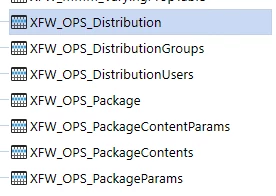
I believe the parameter info you are looking for are stored in the Parcel Service tables.  From System > Database, expand 'Application Database' then 'Tables. Look for the following tables:

Cosimo_0-1647521157814.png


2 replies

CosimoAnswer
Contributor
March 17, 2022

Davy,

I believe the parameter info you are looking for are stored in the Parcel Service tables.  From System > Database, expand 'Application Database' then 'Tables. Look for the following tables:

Cosimo_0-1647521157814.png


DavyAuthor
Contributor
March 17, 2022

You're the best and kindest. Thanks for taking time off your busy schedule to explain so clearly!!

DavyAuthor
Contributor
March 17, 2022

Thanks for your help. Paths were in PackageContents table.
Do you know if we will break anything if we update that path in the PackageContents table directly?