Imports System
Imports System.Collections.Generic
Imports System.Data
Imports System.Data.Common
Imports System.Globalization
Imports System.IO
Imports System.Linq
Imports Microsoft.VisualBasic
Imports OneStream.Finance.Database
Imports OneStream.Finance.Engine
Imports OneStream.Shared.Common
Imports OneStream.Shared.Database
Imports OneStream.Shared.Engine
Imports OneStream.Shared.Wcf
Imports OneStream.Stage.Database
Imports OneStream.Stage.Engine
Imports OneStream.Data.DataFrame
Imports OneStream.Data.DataFrame.Abstractions

Namespace OneStream.BusinessRule.DashboardDataSet.UserHomePageExport

    Public Class MainClass

        Public Function Main(ByVal si As SessionInfo, ByVal globals As BRGlobals, _
                             ByVal api As Object, ByVal args As DashboardDataSetArgs) As Object
            Try
                ' Build the DataTable that will back the Dashboard grid / Excel export
                Dim dt As New DataTable("UserHomePages")
                dt.Columns.Add("UserName",    GetType(String))
                dt.Columns.Add("DisplayName", GetType(String))
                dt.Columns.Add("Email",       GetType(String))
                dt.Columns.Add("IsActive",    GetType(String))
                dt.Columns.Add("HomePage",    GetType(String))

                ' ── 1. Get all users from the OneStream security store ────────────────
                Dim allUsers As List(Of UserSummaryInfo) = BRApi.Security.Admin.GetUsers(si)

                For Each userSummary As UserSummaryInfo In allUsers
                    Dim userName    As String = userSummary.Name
                    Dim displayName As String = userName
                    Dim email       As String = String.Empty
                    Dim isActive    As String = "Unknown"
                    Dim homePage    As String = "(Not Set)"

                    Try
                        ' ── 2. Load the full UserInfo object using the username ───────
                        Dim fullUser As UserInfo = BRApi.Security.Admin.GetUser(si, userName)
                        If fullUser IsNot Nothing AndAlso fullUser.User IsNot Nothing Then
                            displayName = If(String.IsNullOrWhiteSpace(fullUser.User.Name), userName, fullUser.User.Name)
                        End If
                    Catch userEx As Exception
                        ' Continue with fallback values if user load fails
                    End Try

                    Try
                        ' ── 3. Read the file from the OneStream Internal File System ──
                        Dim filePath As String = String.Format("Internal\Users\{0}\UserAppSettings.xml", userName)

                        Dim fileObj As XFFileEx = BRApi.FileSystem.GetFile( _
                            si, FileSystemLocation.ApplicationDatabase, filePath, True, True)

                        If fileObj Is Nothing OrElse fileObj.XFFile Is Nothing Then
                            homePage = "(No Settings File)"
                        Else
                            Dim xDoc As XDocument = Nothing

                            If Not String.IsNullOrWhiteSpace(fileObj.XFFile.XMLData) Then
                                xDoc = XDocument.Parse(fileObj.XFFile.XMLData)
                            ElseIf fileObj.XFFile.ContentFileBytes IsNot Nothing _
                               AndAlso fileObj.XFFile.ContentFileBytes.Length > 0 Then
                                Dim fileText As String = System.Text.Encoding.UTF8.GetString( _
                                    fileObj.XFFile.ContentFileBytes)
                                xDoc = XDocument.Parse(fileText)
                            End If

                            If xDoc IsNot Nothing Then
                                Dim homePageElement As XElement = xDoc.Descendants("SilverlightHomePageUrl").FirstOrDefault()

                                If homePageElement IsNot Nothing Then
                                    Dim rawValue As String = homePageElement.Value.Trim()
                                    Dim parts() As String = rawValue.Split(New String() {"&&"}, StringSplitOptions.RemoveEmptyEntries)

                                    ' Skip known non-dashboard segments and find the dashboard name
                                    Dim skipValues As New List(Of String) From {"true", "false", "default", "unknown"}
                                    Dim dashboardName As String = "(Not Set)"

                                    For Each part As String In parts
                                        Dim cleanPart As String = part.Trim()
                                        ' Skip the Dashboard: prefix segment
                                        If cleanPart.StartsWith("Dashboard:", StringComparison.OrdinalIgnoreCase) Then
                                            Continue For
                                        End If
                                        ' Skip known keyword segments
                                        If skipValues.Contains(cleanPart.ToLower()) Then
                                            Continue For
                                        End If
                                        ' First remaining segment is the dashboard name
                                        dashboardName = cleanPart
                                        Exit For
                                    Next

                                    homePage = dashboardName
                                Else
                                    homePage = "(Not Set)"
                                End If
                            Else
                                homePage = "(No Settings File)"
                            End If
                        End If

                    Catch fileEx As Exception
                        homePage = "(No Settings File)"
                    End Try

                    dt.Rows.Add(userName, displayName, email, isActive, homePage)
                Next

                ' ── 4. Sort by UserName for a clean output ───────────────────────────
                Dim dv As New DataView(dt)
                dv.Sort = "UserName ASC"
                Dim sortedDt As DataTable = dv.ToTable()

                Return sortedDt

            Catch ex As Exception
                Throw ErrorHandler.LogWrite(si, New XFException(si, ex))
            End Try
        End Function

    End Class

End Namespace
This is a Dashboard Data Set Rule that you can assign to a Data Adapter as a Method Query:
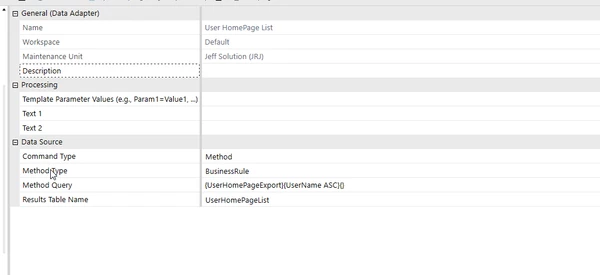
Then you can assign the Data Adapter to a Grid View Component and export the results to Excel or a CSV file.
Hope this helps.
