
Line Item Modeling (LIM) upgrade issue: PV9.0.0 SV4.0.0
Hello,
At the client we currently have SV2.0.1 installed for 3 LIM (Workforce, Duration Based & Fixed Term)
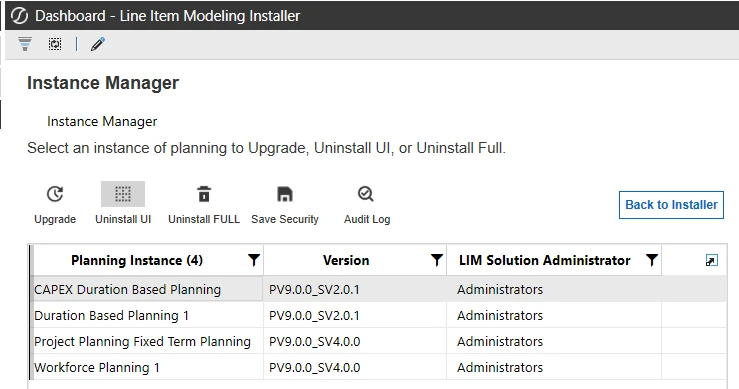
While for Fixed Term & Workforce we were able to upgrade to SV4.0.0, for the Duration Based we are not able to and we receive this error:
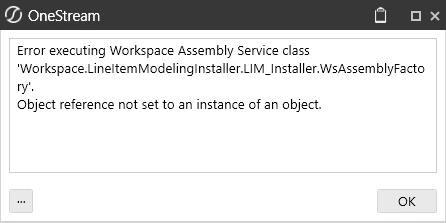
Error log is also not really telling us anything:
Summary: Error executing Workspace Assembly Service class 'Workspace.LineItemModelingInstaller.LIM_Installer.WsAssemblyFactory'.
Message: Object reference not set to an instance of an object.Stack Trace:
at Workspace.LineItemModelingInstaller.LIM_Installer.DataAdapters.LIMInstanceDataAdapter.GetInstanceFromSchemaName(String schemaName)
at Workspace.LineItemModelingInstaller.LIM_Installer.Controllers.InstanceManagerController.OpenUpgradeConfirmationDialog(DashboardExtenderArgs args)
at Workspace.LineItemModelingInstaller.LIM_Installer.WsComponentController.GetSelectionChangedTaskResult(SessionInfo si, BRGlobals brGlobals, DashboardWorkspace workspace, DashboardExtenderArgs args)
at Workspace.LineItemModelingInstaller.LIM_Installer.WsComponentService.ProcessComponentSelectionChanged(SessionInfo si, BRGlobals brGlobals, DashboardWorkspace workspace, DashboardExtenderArgs args)
❗Another important aspect is about custom assembly for the Fixed Term Planning, we had a custom assembly which was deleted during upgrade, while there is a warning in the upgrade guide about copying any modified standard objects as copy items, it doesn’t mention anything about deleting custom newly created assemblies or anything else. This is quite a big issue that should be looked into with high priority.
IMPORTANT: Any custom changes to standard dashboards, reports, or business rules should be saved as renamed or copied objects, as future OneStream solution upgrades may overwrite standard objects and remove unsupported customizations.
❗Another Issue with V2.0.1 which I’m not sure if it got fixed with V4.0.0 is that in the register table if a column is having a ‘Control List’ eg. 1 for Yes and 0 for No, you see Yes or No as values but when you filter you have to filter by ‘1’ or ‘0’. Things get even more complicated when you have enums of strings like ‘Buildings’, ‘Lands’, ‘Equipment’, etc and the ids are 0,1,2 - you need to filter by 0,1,2 because if you filter by the display name it doesn’t work. Hope this gets fixed as well.
I am available for any other debugging steps.