Newcomer
April 25, 2023

Hybrid Scenario Performance

  • April 25, 2023
  • 1 reply
  • 0 views

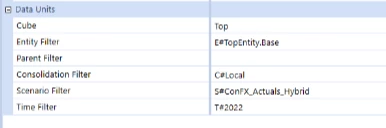
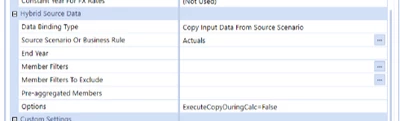
Hello, we are working on a constant currency Actuals scenario that will be using alternate FX rates and are in the process of testing a Hybrid Scenario with the 'Copy Input Data From Source Scenario' setting.  We are running the data copy with a 'Force Calculate' Data Management Step using the 'Execute Scenario Hybrid Source Data Copy' setting.  We have found that after resetting the hybrid scenario, the first run of the copy step is taking around 50 minutes to complete, but subsequent copies are only taking 7 minutes.  Is this expected with a hybrid scenario copy?
ericci_0-1682434471779.png

ericci_0-1682442325417.png

1 reply

OneStream Employee
April 26, 2023

There are optimizations to speed up things, yes. That's one of the advantages of using Hybrid Scenario features vs just running Scenario formulas.

Member
May 17, 2023

Hi Jack,

Is there a way of using Hybrid Scenario features without having to Force calculate to copy data to the new scenario?


OneStream Employee
May 17, 2023

The whole system is based on actions triggered by Calculate. If you're worried about losing or overwriting data you've already calculated, though, there are two options you should check: the "Clear Calculated Data During Calc" boolean on Scenario properties, and the "durable data" options in api.Data.Calculate (which allows you to manage the lifecycle of calculated data explicitly, as you see fit). There is also the ExecuteCopyDuringCalc option that you can pass (True/False) if you want to be in control of when the copy happens.

It makes a bit more sense if you think of Hybrid Scenarios as a feature to help analysis (and hence, expects calculations to have been run) rather than a seeding tool.