Newcomer
September 9, 2022
Solved

How to enable account descriptions that are not English (for example Dutch)?

  • September 9, 2022
  • 2 replies
  • 0 views

Is there a way to enable Account descriptions in other languages like Dutch?

Best answer by NidhiMangtani

Hello,

Found below information in reference guide, might help:
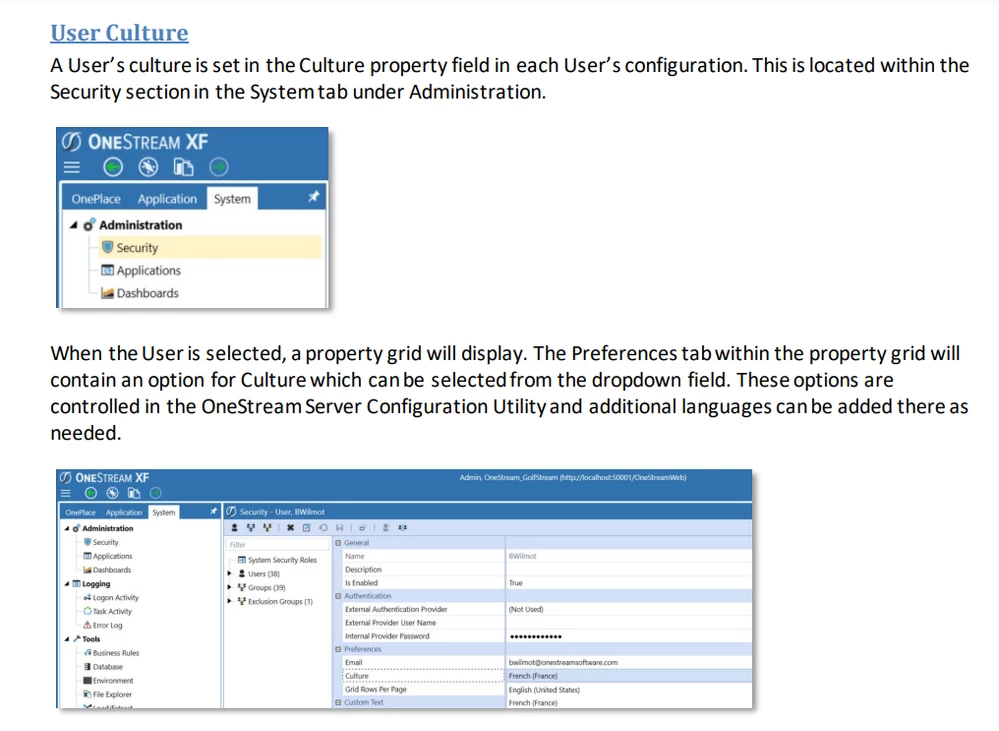
NidhiMangtani_0-1662731694433.png

Please check OneStream Server Configuration Utility to add "Dutch" for your application.

Hope this helps.

2 replies

Veteran
September 9, 2022

Hello,

Found below information in reference guide, might help:

NidhiMangtani_0-1662731694433.png

Please check OneStream Server Configuration Utility to add "Dutch" for your application.

Hope this helps.

mitradAuthor
Newcomer
September 9, 2022

Hi Nidhi,


We do not want to change the default language of accounts or appearance for user, just to add a field to the account description to show the description in Dutch as well as English.

September 12, 2022

If you enable the cultures in the App Config, each culture will show in the Descriptions field of the Member Property

TonyToniTone_0-1663022035462.png

From there, the Culture field in the Cube View ( Headers > Header Text ) can be populated with a |!CultureParam!| to allow the user to pick a culture.  So you won't have the descriptions side by side.  You would have to re-run the Cube View in another language to view the other culture descriptions. 

Another option would be to build a tabbed Dashboard with 2 Cube Views - 1 with the culture for English and 1 with the culture for Dutch.