Newcomer
August 10, 2023
Solved

How to create filter according to single row in cube view?

  • August 10, 2023
  • 2 replies
  • 0 views
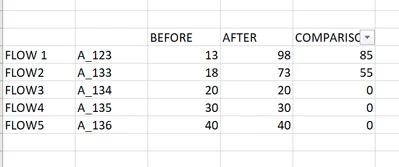
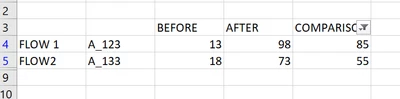
I have tried with the suppressions to make the cells that have 0 disappear but it has not been effective. In the first cell I would show how the data is arranged, and in the second image how I would like it to be
 

SofiaCuadra_2-1691663181944.png

SofiaCuadra_3-1691663209959.png


Best answer by Henning

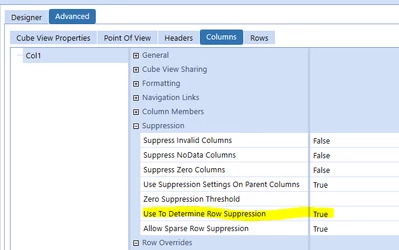
Hi, try using the "Use to Determine Row Suppression" setting:

Henning_0-1691667081946.png

The columns BEFORE and AFTER should be False, and the one you want to use the suppression setting on (i.e. COMPARISON) should be True.


2 replies

HenningOneStream EmployeeAnswer
OneStream Employee
August 10, 2023

Hi, try using the "Use to Determine Row Suppression" setting:

Henning_0-1691667081946.png

The columns BEFORE and AFTER should be False, and the one you want to use the suppression setting on (i.e. COMPARISON) should be True.


Newcomer
August 10, 2023

¡Thank you very much!