Help with Data Buffers
Hi everyone. I am looking for some assistance with using data buffers for a revenue planning form.
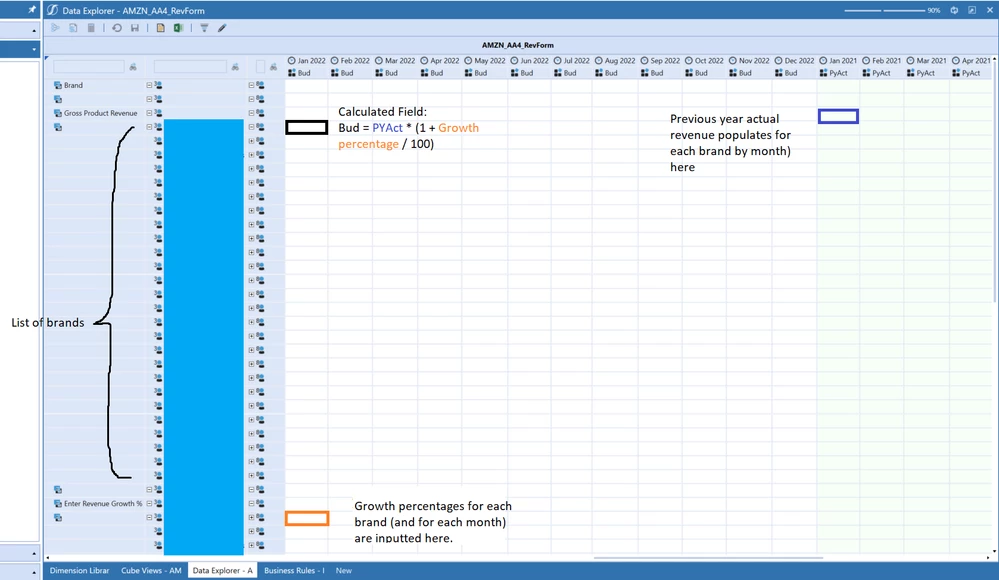
Essentially, budgeted revenue growth percentages will be input individually for each brand by month. The total PY Actual revenue for each brand by month will be loaded into OneStream.
The formula to forecast budget is:
CY Budget = PYAct * (1 + Growth % / 100)
While I can calculate each CY Budget cell individually for each brand by month, this would be a tedious and very long process since there are 26 brands and 12 months, which would require 312 individual calculations.
I would like to use a data buffer instead to calculate CY Budget by looping through each brand (and across all months from Jan 2022 to Dec 2022). However, I am unsure of how to do this and would appreciate guidance.
For ease of reference, I have also attached a screenshot of my cube view.