Member
Jun 7, 2026 8:43 AM UTC
Solved

Headcount calc in LIM WF Model

Is there any way to calculate Headcount where I will use start Data and end date of Current period. If the difference is more than 1 then my HC is 1, I cannot use current period end date in Formula, 

I tried IIF (DateDiff(month, start date, Current Period)>1,1,0) but it is not giving me any result

T_Kress
T_KressAnswer
Contributor
Jun 7, 2026 6:48 PM UTC

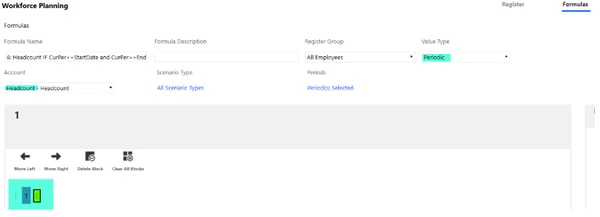
This works out-of-the-box in LIM as follows:

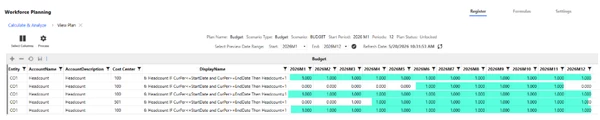
If you set up an account and formula as listed above, then here is how it appears upon calculation:

I have employees with varying start and end dates.  It only populates "1" for headcount for the periods that are => their start date and <= their end date.  That works out of the box.  If you want to do partial month headcount for mid-month starts, then that would be custom.

2 replies

T_Kress
T_KressAnswer
Contributor
Jun 7, 2026 6:48 PM UTC

This works out-of-the-box in LIM as follows:

If you set up an account and formula as listed above, then here is how it appears upon calculation:

I have employees with varying start and end dates.  It only populates "1" for headcount for the periods that are => their start date and <= their end date.  That works out of the box.  If you want to do partial month headcount for mid-month starts, then that would be custom.

Yogesh007Author
Member
Jun 8, 2026 5:22 AM UTC

Thanks for the reply, it works, we have applied formula in "Formula Name" itself.

Isn't it required to set the formula in space provided?