
Member
May 27, 2022
Solved

Globals object in a spreadsheet rule

  • May 27, 2022
  • 2 replies
  • 0 views

Even a simple globals.getObject("_ex") throws a object reference not found error. Is the use of the globals object prohibited inside a spreadsheet rule?

The code:
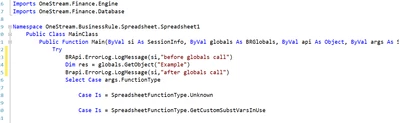
sudarshan_0-1653650729608.png

Error log when this spreadsheet rule is used:

sudarshan_2-1653650913132.png

But if I comment out line number 24, the error log becomes: 

sudarshan_3-1653650941609.png


Best answer by NidhiMangtani

Yes that should work. 

The only solution I can think of for this is to perform the global operations in an extensibility rule and return the object back to the spreadsheet by referencing it.

2 replies

Veteran
May 27, 2022

Hi Sudarshan,

Try holding the object returned by getobject in a datatable or a string,

Dim dt As DataTable = globals.GetObject("Example")

Check if dt has any rows then access the same 

Or in a string 

Dim sGlobalObject As String = globals.GetObject("Example").ToString

Check if string is not null then use it.

Hope this helps.

Thanks,

Bharti


sudarshanAuthor
Member
May 27, 2022

Hi Bharti,

Upon trying this I am still facing the same issue, the updated code:

sudarshan_3-1653660388717.png


sudarshan_1-1653659840659.png

The code is still failing when either trying to perform either a set or get operation on the globals object

sudarshan_2-1653659960906.png

This same piece of code works perfectly when executed in an extensibility rule. The only solution I can think of for this is to perform the global operations in an extensibility rule and return the object back to the spreadsheet by referencing it.


Thanks

Veteran
May 27, 2022

Yes that should work. 

The only solution I can think of for this is to perform the global operations in an extensibility rule and return the object back to the spreadsheet by referencing it.