Solved
Fast way to update IC matching parameters?
Hello
I made a mistake creating the IC matching rules for several workflows related to the entities.
Do you have any suggestion on how to bulk update the IC matching rules?
Thanks in advance
Marcello

Hello
I made a mistake creating the IC matching rules for several workflows related to the entities.
Do you have any suggestion on how to bulk update the IC matching rules?
Thanks in advance
Marcello
Hi Marcello,
for a bulk update, extract the relevant steps from your workflow, run a find and replace and reload the XML file.
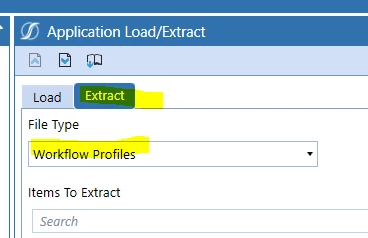
If needed, make use of RegEx (Regular Expressions). Depending on the type of change you are attempting, this can save you a lot of time.
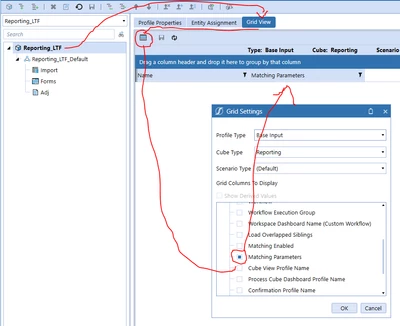
For another sometimes faster way - but not "bulk" - you can also use the Grid view of the workflow profile settings:
Enter your E-mail address. We'll send you an e-mail with instructions to reset your password.