Error calling a Workspace Business Rule from a different Workspace (Data Management Step)
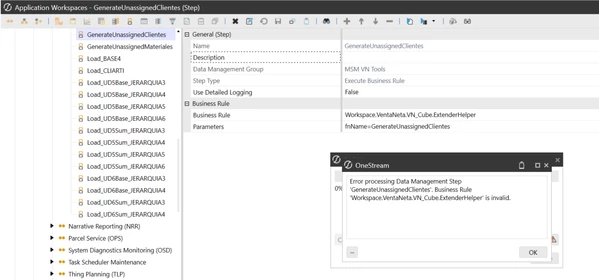
Hello, I am trying to run a Business Rule located in a specific Workspace (VentaNeta) from a Data Management Step that lives in the Default Workspace.
According to the OneStream documentation for cross-workspace references, the syntax should be:
Workspace.MyWorkspaceNameOrNSPrefix.MyWsAssemblyName.MyShortBRName
In my case, I configured it as:
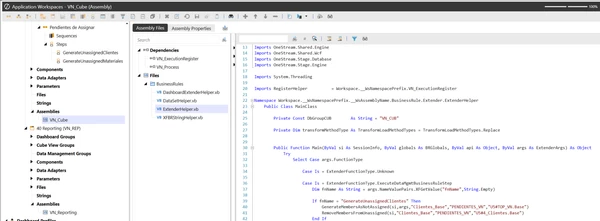
Workspace.VentaNeta.VN_Cube.ExtenderHelper
However, when running the Data Management Sequence from the Default Workspace, it fails with this error:
"Error processing Data Management Step 'GenerateUnassignedClientes'. Business Rule 'Workspace.VentaNeta.VN_Cube.ExtenderHelper' is invalid."
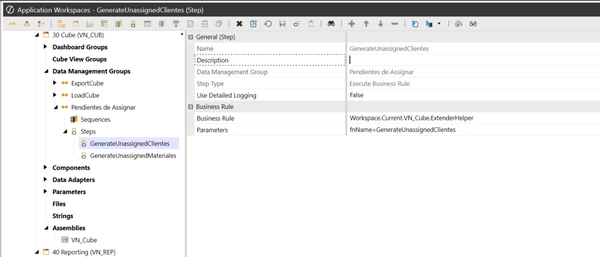
Here is the strange part: If I move this exact same Data Management Step inside the VentaNeta Workspace and change the syntax to use Workspace.Current, it executes perfectly:
Workspace.Current.VN_Cube.ExtenderHelper
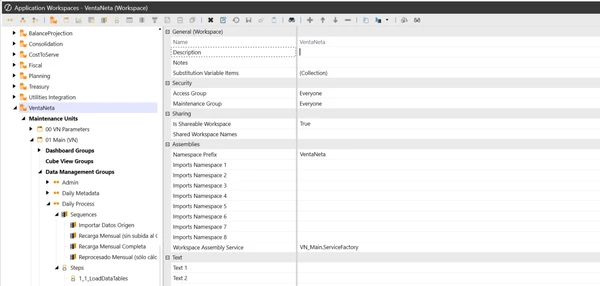
Configuration details for the VentaNeta Workspace:
Workspace Name: VentaNeta
Namespace Prefix: VentaNeta
Is Shareable Workspace: True
My goal is to keep this DM Step inside a master sequence in the Default Workspace.
Has anyone seen this behavior before? Does the "MyWsAssemblyName" token resolve differently when called externally versus using Workspace.Current?
Any help would be greatly appreciated!