
Member
July 15, 2026
Solved

Dynamic cube dimension and data manual refresh

  • July 15, 2026
  • 2 replies
  • 58 views

Hello all,

I have setup a dynamic cube that sources data from a table and creates dynamic dimensions as well.

Works like a charm, but I have been playing around with the refresh times. In our use case, the users would input in a register → review data from dynamic cube in cube view (Using filters, etc) → back to register to make changes.


Some pros/cons in this case
Setting a time for when the data and dimensions are updated would mean they had to wait for updates.

Letting it run for every time the user updates the cube view, means that every filter change etc. would also trigger. Meaning a lot of unnecessary updates.


Anyone has come up with a way where a user can push a button that then triggers a rerun of dimensions and data? This way, I can rely on cache when they are navigating the cube view, but they can actively request an update, when they have made changes.
@JackLacava, Thank you for a great presentation on the tech talk, really good stuff. There you also mention that there are solutions to my problem, but I would need some input.


Best answer by victorthomsen

Hi ​@JackLacava, thank you so much! 

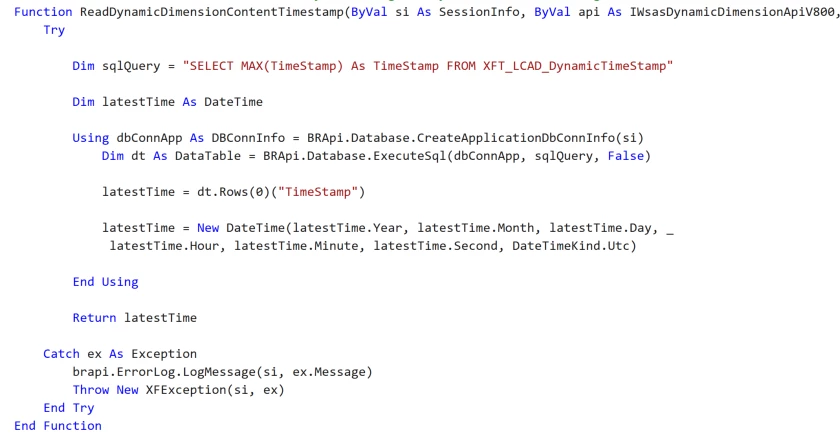
For anyone else interested, this is how I setup my RDDCT

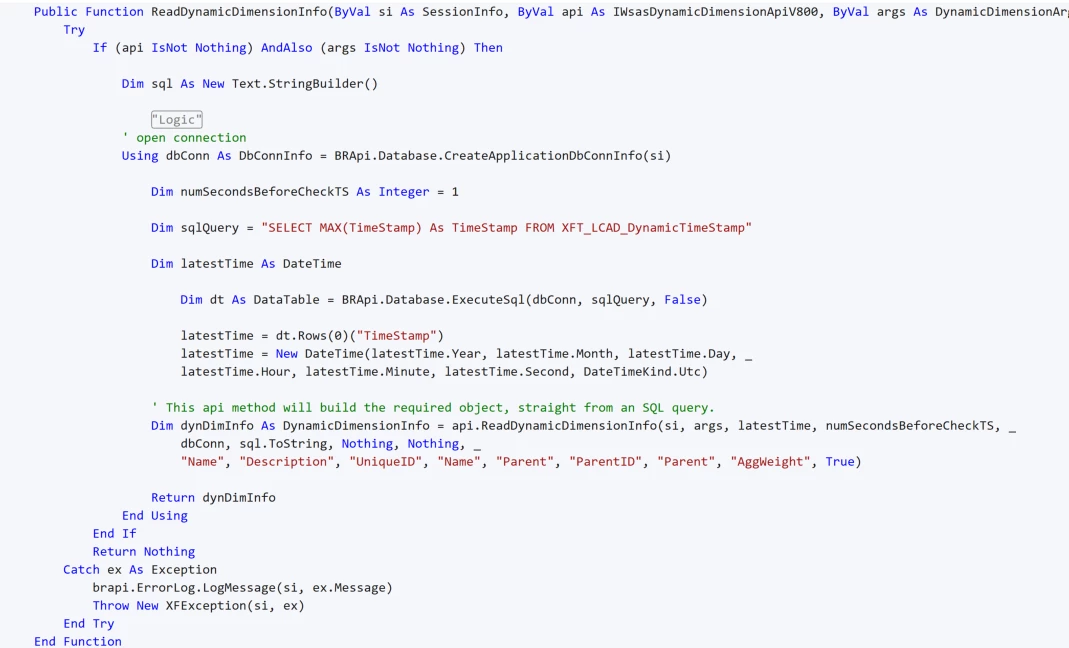
And this is the RDDI.


SQL Table, using DATETIME2(7) As it closest represents the DateTime value from VB.net

CREATE TABLE [XFT_LCAD_DynamicTimeStamp](
Id UNIQUEIDENTIFIER PRIMARY KEY,
TimeStamp DATETIME2(7))


Tip: It is important to specify the type and format properly on your latest timestamp as Jack also mentions.

This is for a dimension, but I used the same logic for the dynamicDataSource

2 replies

Sage
July 16, 2026

What you can do is keep a timestamp (better if in ticks and rounded up to the second) in a custom table (or equivalent). Keep your numSecondsBeforeReadingContentTimestamp values to 1 second, then in ReadDynamicDimensionContentTimestamp return that timestamp (as fast as you can!). That means you’re triggering RDDCT a lot, but because it keeps returning the same value, the system will serve the dimension from cache instead of executing ReadDynamicDimensionInfo. Whenever you want to trigger cache-busting, you change the stored timestamp.

victorthomsenAuthorAnswer
Member
July 21, 2026

Hi ​@JackLacava, thank you so much! 

For anyone else interested, this is how I setup my RDDCT

And this is the RDDI.


SQL Table, using DATETIME2(7) As it closest represents the DateTime value from VB.net

CREATE TABLE [XFT_LCAD_DynamicTimeStamp](
Id UNIQUEIDENTIFIER PRIMARY KEY,
TimeStamp DATETIME2(7))


Tip: It is important to specify the type and format properly on your latest timestamp as Jack also mentions.

This is for a dimension, but I used the same logic for the dynamicDataSource