Newcomer
May 1, 2026
Solved

Deleted member in error

  • May 1, 2026
  • 3 replies
  • 0 views

I inadvertently deleted a member in UD2.  How can I add it back?

Best answer by sameburn

Have you checked under Orphans in your UD2 dimension? It sounds like your original member TAX resides there currently based on your error message (not actually deleted.  It should be noted that you cannot delete a member when data exists against it).
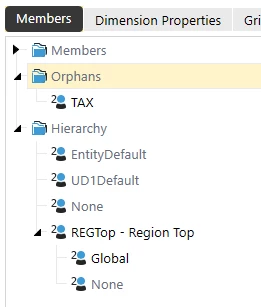


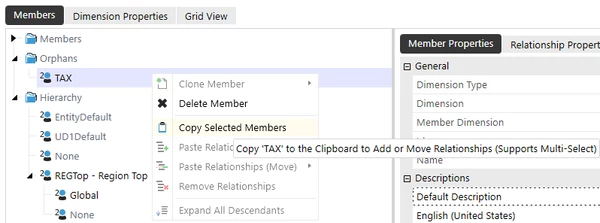
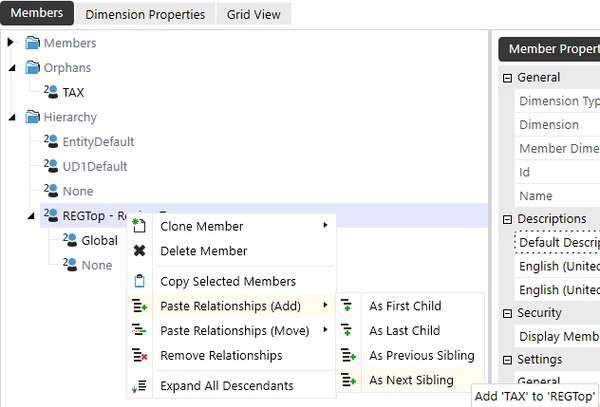
If so, you can add the member back from there to its original position in the hierarchy e.g Copy and Paste


There is more information on this in the Design & Reference Guide - https://documentation.onestream.com/docs/Content/Design%20and%20Reference/Cube/Configurable%20Dimensions.html?Highlight=dimension%20library

Hope this helps

3 replies

OneStream Employee
May 4, 2026

Do you happen to have an extract of your metadata from prior to when it was deleted?

If you have an extract of your metadata from before it was deleted, you could create a new blank application and load in the metadata XML File.  Once you have loaded in the metadata, you could then use the Load/Extract tool and choose "Extract" and just check the dimension that contains the member, right-click on it and choose "Select Members to Extract" and just extract that member.  Then click on the Export button to generate the XML with just this member in it.  Then you could load that XML into your current application to add it back.

You could also request a restore of the application database as well, but you would have to re-enter any changes made from when you deleted the member until the current state.

Those are a couple of options available for you, outside of re-adding the member back manually.


Newcomer
May 4, 2026

Unfortunately we do not have an extract of metadata.  We are also too far along to re-enter changes made.  How would I add it manually.  When I try and add it back in I get an error message saying  " Error saving member. 'TAX' already exists.


sameburnOneStream EmployeeAnswer
OneStream Employee
May 5, 2026

Have you checked under Orphans in your UD2 dimension? It sounds like your original member TAX resides there currently based on your error message (not actually deleted.  It should be noted that you cannot delete a member when data exists against it).


If so, you can add the member back from there to its original position in the hierarchy e.g Copy and Paste


There is more information on this in the Design & Reference Guide - https://documentation.onestream.com/docs/Content/Design%20and%20Reference/Cube/Configurable%20Dimensions.html?Highlight=dimension%20library

Hope this helps

Newcomer
May 5, 2026

I can not thank you enough for your assistance!  This worked!