
Newcomer
May 17, 2023
Solved

DatabasePage Access

  • May 17, 2023
  • 3 replies
  • 0 views

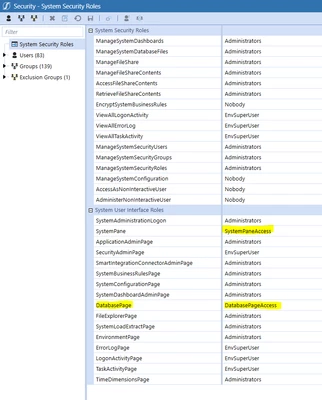
I have been trying to give a couple of our users access to the Database Page in the System Pane. I created a new security group named DatabasePageAccess (and SystemPaneAccess) and add another security group and 2 specific users to this new group. I then changed the security group on the System Security Roles for the DatabasePage System User Interface Role to "DatabasePageAccess" and SystemPane to SystemPaneAccess. Asked the 2 users to test it out. They were able to see the System Pane now but cannot see the Database page still. I have been going in circles and cannot reason why they cannot see the database page when I seem to have done it all correctly. Has anyone else ever seen this?

System Security Roles
ppatel_0-1684355086662.png


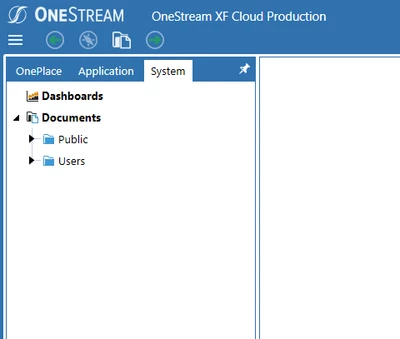
Screenshot from User (does not show the Database page as an option)
ppatel_1-1684355135263.png


Best answer by ppatel

I reached out to Support, and they confirmed that only administrators can have access to the database page because it is all-or-nothing access and only administrators should be able to see all data/tables.

3 replies

Newcomer
May 17, 2023

Not sure whether that one can be given to non-admin users. 

OneStream Employee
May 18, 2023

Doesn't seem to make a difference for me either. You might want to raise it with Support to figure out how that privilege is supposed to work. Please let us know once you get an answer...

ppatelAuthorAnswer
Newcomer
May 22, 2023

I reached out to Support, and they confirmed that only administrators can have access to the database page because it is all-or-nothing access and only administrators should be able to see all data/tables.