Newcomer
March 20, 2023
Solved

Cube View Row Display Question

  • March 20, 2023
  • 1 reply
  • 0 views

Ginger_Main_0-1679336413363.png

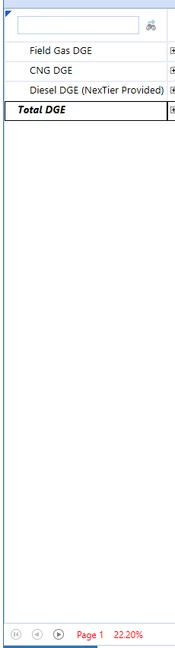
Hey All. I have a cube view for a client that contains a decently sized row count. I don't really understand why Data Explorer will only format the cube view to have 4 rows per page. Does the red paging mean anything?

Best answer by NicolasArgente

Hello!

Short answer : it is all about achieving the performance when retrieving large cube views.
I would suggest that you play around the options of suppression to fully understand what they do and how they display.
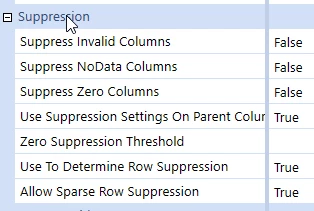
NicolasArgente_0-1679386282077.png


Longer Answer: Cube view paging is only applied to the data explorer view of a cube view and is used to enhance the performance of cube views containing more than 10,000 unsuppressed rows. The cube view will attempt to return up to 2000 unsuppressed rows within a maximum processing time of 20 seconds. The purpose of paging is to protect the server from large cube views that could affect application performance.

To set the properties, on the Cube Views page, under Cube View Groups, select a cube view.
Go to General Settings > Common. The following settings are available.

  • Max Unsuppressed Rows Per Page: Determines how many rows are written before the
    cube view starts paging (default is -1). The maximum value is 100,000.
  • l Max Seconds To Process: Determines how many seconds the cube view processes before it starts paging (default is -1). The maximum value is 600 seconds. 
    (Source: Design Doc)

Please give a kudo if it helps 🙂 Thanks!

1 reply

Veteran
March 21, 2023

Hello!

Short answer : it is all about achieving the performance when retrieving large cube views.
I would suggest that you play around the options of suppression to fully understand what they do and how they display.

NicolasArgente_0-1679386282077.png


Longer Answer: Cube view paging is only applied to the data explorer view of a cube view and is used to enhance the performance of cube views containing more than 10,000 unsuppressed rows. The cube view will attempt to return up to 2000 unsuppressed rows within a maximum processing time of 20 seconds. The purpose of paging is to protect the server from large cube views that could affect application performance.

To set the properties, on the Cube Views page, under Cube View Groups, select a cube view.
Go to General Settings > Common. The following settings are available.

  • Max Unsuppressed Rows Per Page: Determines how many rows are written before the
    cube view starts paging (default is -1). The maximum value is 100,000.
  • l Max Seconds To Process: Determines how many seconds the cube view processes before it starts paging (default is -1). The maximum value is 600 seconds. 
    (Source: Design Doc)

Please give a kudo if it helps 🙂 Thanks!