Newcomer
Oct 27, 2025 6:11 PM UTC
Solved

Cube view no input cell based on parameter selection

In the cube view, I have the customer selection on the dropdown list. When NoCustomer is selected, they want to see data that is loaded on Import. But they want to block the input for NoCustomer on Forms. is there an easy way to achieve this? Like if NoCustomer, read only?


Contributor
Oct 27, 2025 7:56 PM UTC

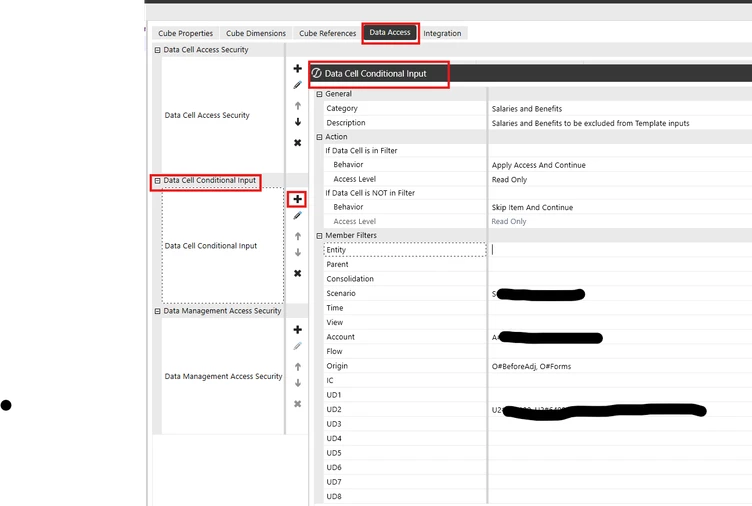
We are doing something similar on our application but we do not have the restriction set at on the Cube View.  We have the restriction set at the Cube level in the Data Access.  Go to Application > Cubes and select the cube where you want to limit the access.  On the 'Data Access' tab you can use the middle section 'Data Cell Conditional Input' to define intersections where you want the data to be Read Only.  You can define the intersection as general or granular as you like.

We use this in our application to limit users being able to change Salaries in the budget and make them read only.  

Denise


4 replies

Contributor
Oct 27, 2025 7:56 PM UTC

We are doing something similar on our application but we do not have the restriction set at on the Cube View.  We have the restriction set at the Cube level in the Data Access.  Go to Application > Cubes and select the cube where you want to limit the access.  On the 'Data Access' tab you can use the middle section 'Data Cell Conditional Input' to define intersections where you want the data to be Read Only.  You can define the intersection as general or granular as you like.

We use this in our application to limit users being able to change Salaries in the budget and make them read only.  

Denise


HironoAuthor
Newcomer
Nov 4, 2025 10:00 PM UTC

Does this stop a business rule from writing data to the blocked member?

Employee - Sage
Nov 5, 2025 11:03 AM UTC

It depends on who or what is running the business rule.