
Newcomer
December 12, 2024
Solved

Cube View Groups - Forms

  • December 12, 2024
  • 3 replies
  • 0 views

Hi Everyone,

I'm designing a form where I display accounts in rows and columns header like Beg Bal, End Bal, Variance, etc.

In the rows, I've configured a member filter as follows, which pulls all accounts under the PREPAY hierarchy, but excludes A#150123:

A#PREPAY.Base.Remove(150123):Name(|MFAccount| - |MFAccountDesc|)

This works perfectly, as it displays all the accounts under the PREPAY hierarchy except A#150123. However, when I try to display the total, I encounter an issue. I'm using the following member filter to display the total, but it doesn't work:

A#PREPAY.Remove(150123):Name(Total: Prepaid RF, net)
or
A#PREPAY.Remove(A#150123):Name(Total: Prepaid RF, net)

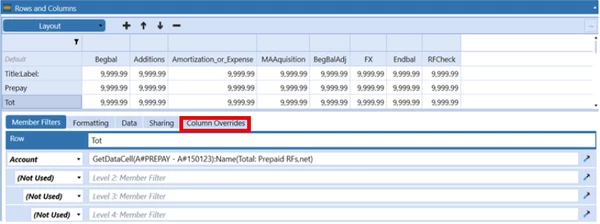
As a workaround, I have displayed the accounts under PREPAY individually and used the following formula to display the total:

Is there a simpler or more efficient way to achieve this without the workaround?

TIA
Best answer by Pete

You may want to try putting in that "GetDataCell(CVC([Endbal]) + CVC([BegBalAdj]) - CVC([Begbal]) - CVC([Additions]) + CVC([Amortization_or_Expense]) + CVC([MAAquisition])):Name(Variance must be 0)" in the Column Overrides on the "Tot" row.

You will need to indicate the Column Range as RFCheck and then put the formula in the member filter. 

3 replies

T_Kress
OneStream Employee
OneStream Employee
December 12, 2024

The .Remove will work with expansions, but not by removing that account from the total.  I would suggest an alternate account rollup called PREPAYX where you have an account (subtotal in the main hierarchy or alternate rollup) that you can pull into your cube view.

Newcomer
December 12, 2024

You could also just do a GetDataCell(A#PREPAY-A#150123):Name(Total: Prepaid RF, net). By doing this you would lose the ability to drill down, but all of your details are in the rows above as well.

 If you're going to use this time and time again, then I would definitely go down the route of an alternate hierarchy so you could just call that A#PREPAYX like T_Kress mentioned. 

ArchanaAuthor
Newcomer
December 12, 2024

Thanks for your response! I've tried using GetDataCell(A#PREPAY-A#150123), and it works as expected for BegBal, but not throughout. FYI, The RFCheck (i.e., Variance must be 0) column uses the following formula:

GetDataCell(CVC([Endbal]) + CVC([BegBalAdj]) - CVC([Begbal]) - CVC([Additions]) + CVC([Amortization_or_Expense]) + CVC([MAAquisition])):Name(Variance must be 0)

Do I need to do any changes to the properties?


PeteAnswer
Newcomer
December 12, 2024

You may want to try putting in that "GetDataCell(CVC([Endbal]) + CVC([BegBalAdj]) - CVC([Begbal]) - CVC([Additions]) + CVC([Amortization_or_Expense]) + CVC([MAAquisition])):Name(Variance must be 0)" in the Column Overrides on the "Tot" row.

You will need to indicate the Column Range as RFCheck and then put the formula in the member filter. 

ArchanaAuthor
Newcomer
December 12, 2024

Thanks for your response!