
Newcomer
January 8, 2026
Solved

Configure access to different applications

  • January 8, 2026
  • 2 replies
  • 0 views

Hi all, 

I'm currently using different applications within the same environment and I need to give some users access to specific applications.

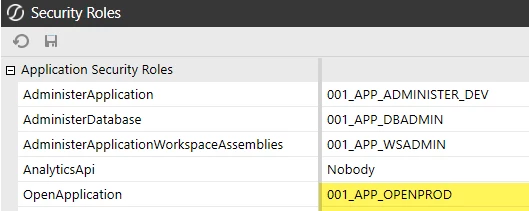
To configure who accesses what, I though I had to assign a security group to the 'OpenApplication' setting within the Security Roles interface, but it seems like it's not working.

Does anyone know how can I manage users access to the different applications? and do I need to configure it singularly on every application or can I manage the access to a single application from a different application?

Thanks!
Best answer by T_Kress

You are on the right track.  Create a separate security group for this role for each application:

Then put people into the group(s) to which applications they need.  It should work, but the users cannot be in the "Administrators" group, as that group trumps all access and grants all access.

It is straight forward and as long as they are not in the "Administrators" group, that will work.

2 replies

T_Kress
OneStream Employee
T_KressOneStream EmployeeAnswer
OneStream Employee
January 8, 2026

You are on the right track.  Create a separate security group for this role for each application:

Then put people into the group(s) to which applications they need.  It should work, but the users cannot be in the "Administrators" group, as that group trumps all access and grants all access.

It is straight forward and as long as they are not in the "Administrators" group, that will work.

fc3Author
Newcomer
January 12, 2026

Thank you T_Kress