
Newcomer
May 10, 2022
Solved

Combo box with search function

  • May 10, 2022
  • 1 reply
  • 0 views

Hi everyone,

Is it possible to set a search/filter option in the combo box where user can type in the value and it will be picked up from the underlying list? 

Alternatively, another component that can do it? I have tried using the tree view with search and filter option but it does not display anything if I use member list as bound parameter. Any other parameter type should be used specifically for tree view to work?
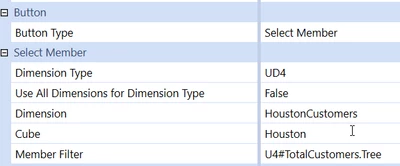
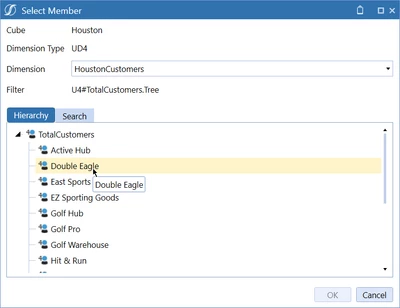
Best answer by ckattookaran

If that doesn't work, then the next option is to use a select member button.

ckattookaran_1-1652391746589.png


ckattookaran_2-1652391762569.png


1 reply

Newcomer
May 10, 2022

Did you try using the Member Tree component? The parameter will be a member list parameter. (Not sure whether you need .TreeDescendants as the expansion. I can't remember that part now.)

LarysaZAuthor
Newcomer
May 12, 2022

Thank you! I have tried  a member tree component with member list as a parameter but just get an empty box. The same parameter assigned to a combo box gives me a list as expected. I attach the printscreens here. Can I kindly ask you to check if I aDashboard.jpgMember Tree.jpgParameter.jpgm I missing anything in the set up?

Newcomer
May 12, 2022

If that doesn't work, then the next option is to use a select member button.

ckattookaran_1-1652391746589.png


ckattookaran_2-1652391762569.png