
Combo Box value item displays the wrong selection
Hi All,
I have a combo box that is in the main dashboard called cb_OnMaindash. The combo box has a parameter linked to it (i.e., a bound parameter) this is delimited list parameter called dl_ComboBox_param. The display items (dash1, dash2, dash3, dash4) and value item (Dashboard_1, Dashboard_2, Dashboard_3, Dashboard_4). These value items are actual dashboard that I am trying to pull when ever a user selects a specific item from the combo box.
Parameter
- name: dl_ComboBox_param
- parameter type: delimited list
- display items: dash1, dash2, dash3, dash4
- value items: Dashboard_1, Dashboard_2, Dashboard_3, Dashboard_4
Combo Box
- Name: cb_OnMaindash
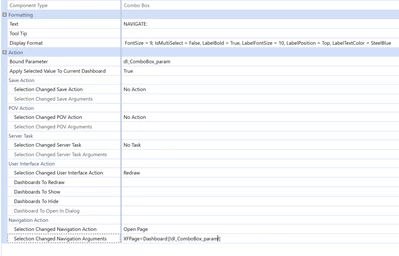
The issue is when i am testing this and select dash1 the dashboard is loaded but the item displayed on the combo box is wrong for example it would display Dash3 instead of Dash1. same thing if I were to select Dash2 and it will either display Dash1 or Dash3. it will only update the selected item if I click the selected item twice. I truly appreciate it the help! Thank you!
I found something similar to this situation and tried to follow the step, but failed. this example relates to a button. reference: https://community.onestreamsoftware.com/t5/Rules/Button-Highlighting-Business-Rule-quot-Load-Dashboard-Server/m-p/11826#M847