
Newcomer
February 18, 2022
Solved

Account dimension member "In Use" property

  • February 18, 2022
  • 1 reply
  • 0 views

Account dimension member "In Use" property (Vary by Scenario Type and Time) set to Scenario Type = "Control" and Time to "2022M2", Stored value "False"
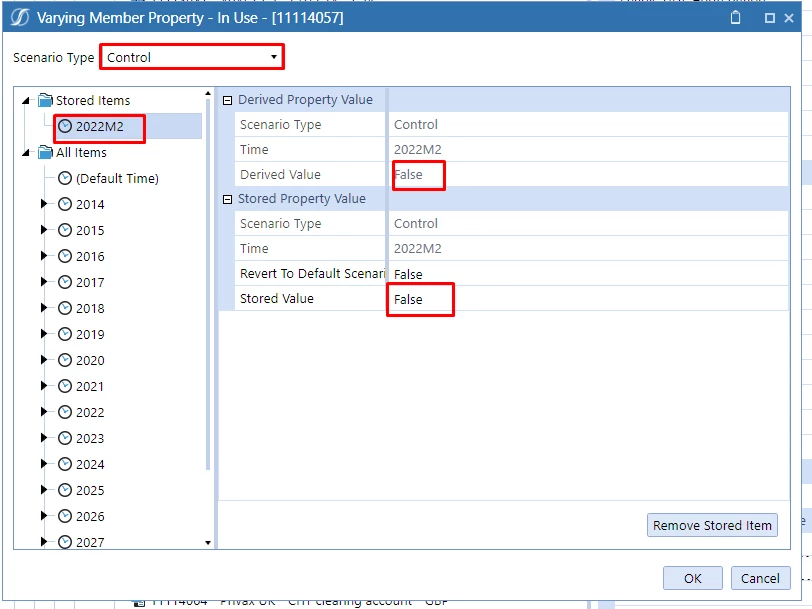
control.png
However when I try to grab the InUse value via a BR it always returns "True"


Dim varyByScenarioTypeId As Integer = ScenarioDimHelper.GetIdFromName(si, "ActCon")
Dim varyByTimeId As Integer = TimeDimHelper.GetIdFromName("2022M2")
Dim boolInUse As Boolean = BRApi.Finance.Account.InUse(si, memberId, varyByScenarioTypeId, varyByTimeId)


But works fine if I set the Scenario Type = "Actual" or "Budget". Doesn't work if Scenario Type = "Control"

Any ideas?

Best answer by EricOsmanski

Looks like you might be grabbing the Scenario ID instead of the ScenarioType ID. Try this for the scenario type ID: 

Dim scenarioTypeId As Integer = api.Scenario.GetScenarioType(scenarioId).Id


1 reply

OneStream Employee
February 18, 2022

Looks like you might be grabbing the Scenario ID instead of the ScenarioType ID. Try this for the scenario type ID: 

Dim scenarioTypeId As Integer = api.Scenario.GetScenarioType(scenarioId).Id


Newcomer
February 18, 2022

Thanks Eric. Works perfect. I was using the ScenarioID rather than ScenarioTypeId.

Best

Sai