Contributor
October 30, 2024
Solved

New connection requiring a date and scenario transformation rule

  • October 30, 2024
  • 2 replies
  • 0 views

I cloned an existing connection that pulls the Scenario and Date from the workflow.  The new connection is requiring me setup a  New Scenario Transformation rule that is basically Budget --> Budget and time rule 2024M1 --> 2024M1.  The connection I cloned doesn't require the additional rules and was pulling Actuals.  All my Data Sources, Scenario, and Workflow settings seem the same.  Any suggestions on what I am missing?  I don't want to maintain the time rules, so that's why I'm trying to see what I'm doing wrong.
Best answer by tledet

Referencing the data source...

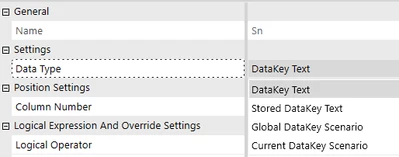
For scenario, verify the Data Source is configured to Global DataKey Scenario or Current DataKey Scenario.  This is typically Current DataKey Scenario.

tledet_0-1730313503472.png

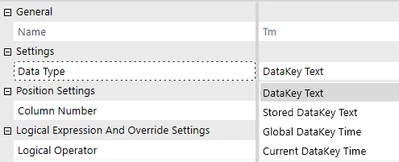
For time, verify the Data Source is configured to Global DataKey Time or Current DataKey Time.  This is typically Current DataKey Time.

tledet_2-1730313819141.png


2 replies

tledetOneStream EmployeeAnswer
OneStream Employee
October 30, 2024

Referencing the data source...

For scenario, verify the Data Source is configured to Global DataKey Scenario or Current DataKey Scenario.  This is typically Current DataKey Scenario.

tledet_0-1730313503472.png

For time, verify the Data Source is configured to Global DataKey Time or Current DataKey Time.  This is typically Current DataKey Time.

tledet_2-1730313819141.png


johnal67Author
Contributor
October 30, 2024

Okay, I think I've got it based on your questions.  My time was working okay afterall, but I did have the Scenario set to stored text because I found out that was the only way to do a Composite rule based on Scenario.  I have a single transformation rule that needed to work with the two different data source connectors.  Thank you for the information!  Sometimes I need a nudge.