
Contributor
June 11, 2026
Question

How can I force a delimited data source to not skip blank values in an Amount field?

  • June 11, 2026
  • 2 replies
  • 0 views

I have a situation where I'm trying to load trial balances from QuickBooks. The source file I'm receiving has three comma-separated columns - Account+Description, Debit, Credit.

QuickBooks has a quirky output format where some debit balances are shown as "$-" (presumably to represent 0.00), leaving the credit column blank.  If there is a credit value in the credit column, the debit column is blank.  This is messing with OneStream's numeric processing of the Amount column when Amount is mapped to Column 2 (Debit column). It is rejecting the "$-" field values and the blank field values as Non-Numeric Amounts (verified in the XFL log file for the load).
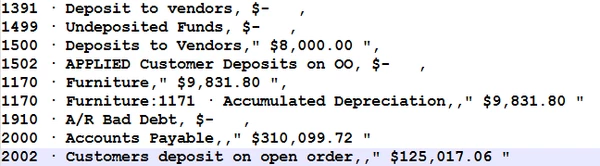
I can successfully replace '$-' with 0 using the Substitute Settings in the data source's Amount dimension, but I cannot figure out how to replace 'no value' in the Debit column with 0 (so that the valid Credit column values don't get skipped).  I'm using a Parser Business Rule to return the net amount (debit column 2 minus credit column 3) for the Amount value, but the records where the Debit column is blank never make it to the parser rule (e.g. accounts 1170, 2000, and 2002 in the screen capture of the source file) because of OneStream's built-in Non-Numeric Amount preprocessing.  I've tried various combinations in the Substitution Strings settings, hoping to find one that replaces the empty field with '0', but with no luck.
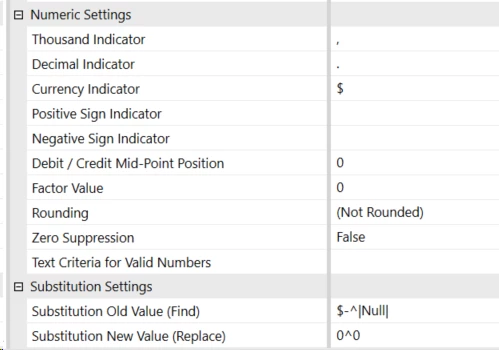
I've tried all of the following Find combinations (the '$-' does successfully produce a 0 by the way). And yes, I know the documentation lists |Null| as a valid Replace value, not a Find value, but I thought I would try it in the Find string just to see if it worked:

$-^

^$-

|Null|^$-

$-^|Null|

2 replies

OneStream Employee
June 12, 2026
Can you give this a shot in a Parser Rule:
 
Dim defaultValue As Decimal = "0.00"
 
'Check the source value that was parsed
If args.Value.Length = 0 Then
'Nothing was found on this row, so return the default
Return defaultValue
Else
'This line has a value, so just return that value
Return args.Value
End If


Expert
June 15, 2026

There is the Fixed Debit Credits parser script in GolfStream that might give you a clue:

Namespace OneStream.BusinessRule.Parser.XFR_ParseFixedDebitsCredits
	Public Class MainClass
		'------------------------------------------------------------------------------------------------------------
		'Reference Code: 	XFR_ParseFixedDebitsCredits 
		'
		'Description:		Parse a fixed numeric column based on a mid-point position in order to determine debits and credits.
		'					This script is required for file formats that have values in both the Debit and Credit column.  It performs
		'					extra tests to if the debit column is zero, if so it moves on to the take the credit column as the value.
		'
		'Usage:				Parser business rule intended to be used on numeric field containing a values for debits and credits.
		'
		'Created By:		Tom Shea
		'Date Created:		1-13-2014
		'------------------------------------------------------------------------------------------------------------				
		Public Function Main(ByVal si As SessionInfo, ByVal globals As BRGlobals, ByVal api As ParserDimension, ByVal args As ParserArgs) As Object
			Try
                'Make sure the line is longer than the amount field position + length of field
				If (args.Line.Length >= (api.DimensionStartPosition + api.DimensionLength - 1)) Then				
					'Declare the Debit/Credit midpoint position
					Dim midPoint As Integer = 12
					Dim fieldValue As String = Mid(args.Line, api.DimensionStartPosition, api.DimensionLength)
									
					'Parse the Debits & Credits in order to return the NON-ZERO value
					If fieldValue.Length > midPoint Then
	                    Dim strDebit As String = fieldValue.Substring(0, midPoint).Trim
	                    Dim strCredit As String = fieldValue.Substring(midPoint, fieldValue.Length - midPoint).Trim
						
						If IsNumeric(strDebit) And IsNumeric(strCredit) Then
							If CType(strDebit, Double) = 0 And CType(strCredit, Double) = 0 Then
								'Both a values are non-numeric, just return the incoming value so we can log it
								api.ValueIsZeroSuppressed = True
								Return "0"						
							Else
								If CType(strDebit, Double) <> 0 Then
									'Debit is not zero
									api.ValueIsnumeric = True
									Return strDebit
								Else
									'Debit was zero, so return the credit
									api.ValueIsnumeric = True
									Return strCredit & "-"
								End If
							End If
						Else If IsNumeric(strDebit) Then
							'Debit is a valid number
							api.ValueIsnumeric = True
							Return strDebit
						Else If IsNumeric(strCredit) Then
							'Credit is a valid number
							api.ValueIsnumeric = True
							Return strCredit & "-"
						Else
							'Both a values are non-numeric, just return the incoming value so we can log it
							api.ValueIsnumeric = False
							Return args.Value
						End If                    
					Else
						'Value is less than mid point, just return the incoming value so we can log it
						api.ValueIsnumeric = False
						Return args.Value		
	                End If
				Else
					'Line is blank or not long enough
					Return args.Value
				End If
				
				Return Nothing
			Catch ex As Exception
				Throw ErrorHandler.LogWrite(si, New XFException(si, ex))
			End Try
		End Function
	End Class
End Namespace