Newcomer
November 13, 2025
Solved

Retrieve App Names from Development Environment via Business Rule

  • November 13, 2025
  • 3 replies
  • 0 views

Hi, as the title suggests, I'm looking for a way to pull a list of all app names that reside within our Development environment. I know the Snapshot report provides this (but BR are encrypted), but I was wondering if there's a BR way to achieve it.

Here is a snippet of what I was attempting to. Please feel free to critique or provide suggestion. Thank you! 

 
Dim brapi As BRApi = CType(api, BRApi)
Dim dbConnFramework As DbConnInfo = brapi.Database.CreateFrameworkDbConnInfo(si)
 
Using dbConnFramework
 
Dim connectionlink As String = si.WebServerUrlUsedByClient
'Here I was trying to access the environment DB which I believe holds the records
    Dim sql As String = "SELECT AppName FROM dbo.App ORDER BY AppName"
 
    Dim sb As New StringBuilder()
    sb.AppendLine("----------- OneStream Applications in Dev ---------")
    sb.AppendLine("")
 
    Dim rowCount As Integer = 0
 
    Using dt As DataTable = brapi.Database.ExecuteSql(dbConnFramework, sql, True)
        If dt.Rows.Count = 0 Then
            sb.AppendLine("No applications found.")
        Else
            For i As Integer = 0 To dt.Rows.Count - 1
                sb.AppendLine((i + 1).ToString() & ". " & dt.Rows(i)("AppName").ToString())
            Next
        End If
        rowCount = dt.Rows.Count
    End Using
 
    sb.AppendLine("")
    sb.AppendLine("Total Applications: " & rowCount)
 
    Throw New XFUserMsgException(si, "", "", connectionlink.ToString())
End Using


    Best answer by sameburn

    Hi Avatar-Roku​ 

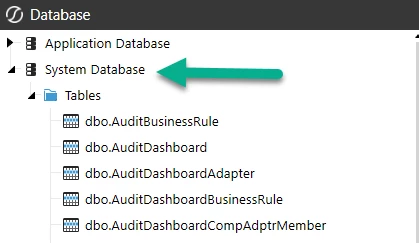
    To check which Database Table you need, I would recommend checking System->Database in OneStream, first. 

    In your example dbo.App is not a real table that actually exists in the Framework (FW) Database (be careful with using CoPilot for OneStream specific code).

    For reference, this is the Framework database and we can reference tables and their contents from here.

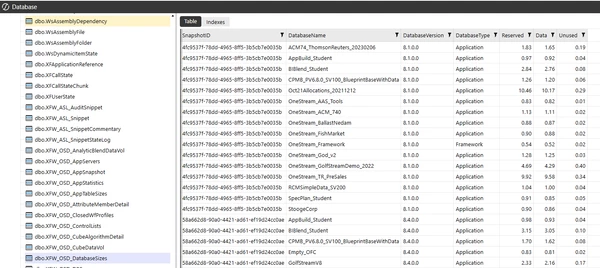
    If we take your OSD example, as you have this installed, there is a table here called [dbo].[XFW_OSD_DatabaseSizes], but if we take a look at this table, we have multiple instances of the same Database Name e.g. AppBuildStudent (in my example below)


    Therefore it is safer to write a DISTINCT SELECT statement to this table to retrieve the unique DatabaseName(s) for your environment (the FW database is environment-wide)

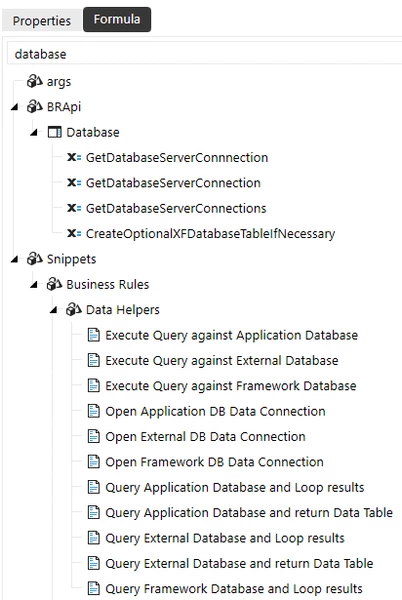
    There are snippets available on how to create database connections to App, Framework and external databases, correctly


    So if we take your original example and refactor based on the information above, we get something like this; which gives you the correct result (and does not error)

    ' Declare StringBuilder
    Dim sb As New Text.StringBuilder()
    ' Declare SQL
    Dim sql As String = "SELECT DISTINCT [DatabaseName] FROM [dbo].[XFW_OSD_DatabaseSizes] ORDER BY [DatabaseName]"				
    'Open connection to Framework database
    Using dbConnFW As DBConnInfo = BRApi.Database.CreateFrameworkDbConnInfo(si)
    	Using dt As DataTable = BRAPi.Database.ExecuteSql(dbConnFW, sql, True)	
    		If Not dt Is Nothing Then
                For Each dr As DataRow In dt.Rows
                    'Process rows
                    sb.AppendLine(dr("DatabaseName"))
                Next
    		Else
    			sb.AppendLine("No applications found.")
            End If	
    	    sb.AppendLine(String.Empty)
    	    sb.AppendLine($"Total Applications {dt.Rows.Count}")
    		Throw New XFUserMsgException(si, String.Empty, String.Empty, sb.ToString())
    	End Using
    End Using	

    Hope this helps

    Sam

    3 replies

    sameburnOneStream EmployeeAnswer
    OneStream Employee
    November 14, 2025

    Hi Avatar-Roku​ 

    To check which Database Table you need, I would recommend checking System->Database in OneStream, first. 

    In your example dbo.App is not a real table that actually exists in the Framework (FW) Database (be careful with using CoPilot for OneStream specific code).

    For reference, this is the Framework database and we can reference tables and their contents from here.

    If we take your OSD example, as you have this installed, there is a table here called [dbo].[XFW_OSD_DatabaseSizes], but if we take a look at this table, we have multiple instances of the same Database Name e.g. AppBuildStudent (in my example below)


    Therefore it is safer to write a DISTINCT SELECT statement to this table to retrieve the unique DatabaseName(s) for your environment (the FW database is environment-wide)

    There are snippets available on how to create database connections to App, Framework and external databases, correctly


    So if we take your original example and refactor based on the information above, we get something like this; which gives you the correct result (and does not error)

    ' Declare StringBuilder
    Dim sb As New Text.StringBuilder()
    ' Declare SQL
    Dim sql As String = "SELECT DISTINCT [DatabaseName] FROM [dbo].[XFW_OSD_DatabaseSizes] ORDER BY [DatabaseName]"				
    'Open connection to Framework database
    Using dbConnFW As DBConnInfo = BRApi.Database.CreateFrameworkDbConnInfo(si)
    	Using dt As DataTable = BRAPi.Database.ExecuteSql(dbConnFW, sql, True)	
    		If Not dt Is Nothing Then
                For Each dr As DataRow In dt.Rows
                    'Process rows
                    sb.AppendLine(dr("DatabaseName"))
                Next
    		Else
    			sb.AppendLine("No applications found.")
            End If	
    	    sb.AppendLine(String.Empty)
    	    sb.AppendLine($"Total Applications {dt.Rows.Count}")
    		Throw New XFUserMsgException(si, String.Empty, String.Empty, sb.ToString())
    	End Using
    End Using	

    Hope this helps

    Sam

    Newcomer
    November 14, 2025

    Thank you, Sam.

    Could you please show me where to find the snippets? Are they located within the Business Rules?

    OneStream Employee
    November 14, 2025


    OneStream Employee
    November 14, 2025

    Am I looking at an AI generated code ? 😅

    Newcomer
    November 14, 2025

    I am unware of any App table in the Framework DB.  Change your SQL query to the following:

    SELECT TextValue FROM ServerConfig WHERE ItemName1='ApplicationName'