
Newcomer
June 12, 2026
Question

Title: Genesis Error Occurring for Some Users with Identical Access Rights

  • June 12, 2026
  • 2 replies
  • 0 views

Hello,

We are experiencing an intermittent Genesis error.

All default values appear to be correctly configured, but the error is triggered for some users and not for others, even when they have the same security roles and access rights. The issue is also not tied to a specific report, as it can occur on different reports depending on the user.

Has anyone encountered a similar issue?

Example error message:
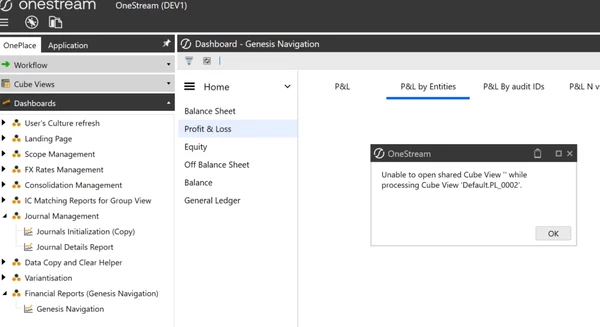
We also noticed that when we remove the link between the Content and Main workspaces, the issue is resolved. However, this workaround does not work for all affected users.

Thank you for your help.

2 replies

OneStream Employee
June 12, 2026

Hi Saliha​ 

I could be wrong, but the error suggests it is not Security or indeed Genesis related

It looks like a CubeView you are using has shared row or columns using a Parameter and that Parameter is not being resolved at runtime e.g returning "" instead of a value

I suspect why it is working for some users over others might relate to the fact that any user this works for has already run this Cubeview successfully before, which means it will default to the last selected Parameter value. Whereas users experiencing the error had not run this before and therefore the Parameter and the Cubeview remain unresolved 

If you run the offending Cubeview on its own, I suspect the user is prompted for a column or row selection in a parameter prompt window, something that is not occurring when running it in Genesis based on current setup

If receiving this for multiple reports,  it might be that you have >1 cubeview with same issue 

It is worth making an inventory of the cubeviews you are using here, to investigate further e.g check shared rows / columns for parameters and also check parameters have a default value set.

Hope this helps

Sam

OneStream Employee
June 16, 2026

This also might help your investigations.  In my experience issues like the one you have arise when, for example the default value on a parameter is updated or the parameter itself is unresolved.  A good way to demystify is to Reset Parameter Selections (you can do this from Genesis, for example) in the Windows Client Application.  This would need to be completed by all users impacted (as well as investigating root cause as above)