Newcomer
September 28, 2022
Solved

BI Viewer - sync 2nd Y-Axis

  • September 28, 2022
  • 2 replies
  • 0 views

I have a bar and line chart (line being the 2nd Y-Axis).  I want to sync the two scales; Anyone know how to do that?  I did not see an option to sync and looking for guidance. 

Best answer by JackLacava

The secondary axis is meant to highlight similar trends on a different scale, not to replicate the original one. If you want both datasets on the same scale, just deselect the "Plot on secondary axis" option and they should "merge" on the same scale on the left.

Open the options for the dataset currently plotted on the right axis:

JackLacava_0-1664463826236.png

Then deselect the option and click Ok:
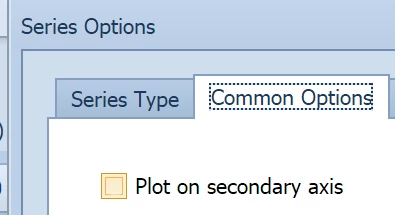
JackLacava_1-1664463843491.png

Hope that helps!

2 replies

OneStream Employee
September 29, 2022

Hi Sarah, I'm not sure I understand what you mean by "sync". Can you post a few screenshots of your settings and outcomes, to clarify...?

SarahWAuthor
Newcomer
September 29, 2022

Hello Jack.  I am just trying to get the same scale on the both of the Y axis.  The black line is similar to a budget.  It looks like the sales are below budget based on the graph, but there a few periods that are above budget.  If I can get them on the same scale then the black line would move down and thus the pic would show some periods above budget.  does that make sense? 

SarahW_0-1664460878016.png


OneStream Employee
September 29, 2022

The secondary axis is meant to highlight similar trends on a different scale, not to replicate the original one. If you want both datasets on the same scale, just deselect the "Plot on secondary axis" option and they should "merge" on the same scale on the left.

Open the options for the dataset currently plotted on the right axis:

JackLacava_0-1664463826236.png

Then deselect the option and click Ok:

JackLacava_1-1664463843491.png

Hope that helps!

SarahWAuthor
Newcomer
September 29, 2022

Thank  you.  That is what I needed.  I thought I needed to plot it as a second axis (had to do that on other BI applications).  I worked just as you said.  Greatly appreciate the help!