



Contributing to the Community
Why join the OneStream Community?
The OneStream Community is a central source for technical professionals to problem solve, share knowledge, and engage with peers and OneStream. It is made up of technical forums, assorted resources, news, and IdeaStream (product enhancement requests). Joining lets you take full advantage of the Community, including the ability to post comments and questions, receive email notifications when someone responds to your posts, exchange private messages with other members, personalize your community experience, and submit and vote on ideas in IdeaStream.
Without an account, you are limited to browsing, searching, and reading posts. You will not be able to give likes, vote on ideas, interact with other community members, or set customization preferences.
The OneStream Community is fully responsive and works on mobile devices, so you can participate and stay up to date on the go.
Share your ideas and influence the product
IdeaStream is a collaborative feedback channel where OneStream customers and partners can submit, vote, and discuss ideas on how to improve the OneStream platform. IdeaStream helps OneStream prioritize its product roadmap based on community input. As a registered member, you can submit new ideas and vote on suggestions from other users — one of the most direct ways to shape the future of the product.
Join groups and connect with peers
The OneStream Community offers Groups — dedicated spaces for beta testers, regional users, and role-based communities. Joining a group gives you access to focused discussions, exclusive resources, and the ability to connect with peers who share your interests and responsibilities.
Product Updates
The Product Updates section is where the OneStream team publishes announcements about new features, releases, and changes to the product. Click Product Updates in the top navigation menu to stay informed. Click Subscribe to receive email notifications whenever a new update is published.
Using the Knowledge Base
The Knowledge Base contains curated articles, how-to guides, and reference documentation written or approved by the OneStream team — separate from the community forums where members hold conversations. If you are looking for step-by-step guidance or official documentation, start in the Knowledge Base. Browse by category from the navigation menu, or use the search bar and filter results to Knowledge Base articles only.
Forums, News, and Technical Documents
The OneStream Community offers three types of content, each serving a different purpose:
Forums are open discussions between community members. The solutions expressed here reflect community input and may not represent the only or absolute correct solution. Forums are a place to ask questions, debate approaches, and crowdsource answers — bear in mind that not everything in forums can be fully vetted.
Technical Documents are vetted, factual resources supplied by approved sources. These include Foundational Design Guides, Office Hours Q&A, and Code Samples. Technical Documents go through a review process before publishing.
News is informational and discussion-oriented. It is not typically technical in nature and is often comprised of announcements, promotions and general in nature.
Code of Conduct
Before posting, please read our Code of Conduct. As a participant in these forums, you agree to uphold the Code of Conduct and are responsible for all activities and content you post or upload. You are also responsible for adhering to all applicable local and national laws. This is your community — help us keep it safe, friendly, fun, and helpful.
Searching before you post
Before creating a new topic, search the community first. Chances are someone has already asked your question and you may find an answer immediately. Use the search bar at the top of any page — results include both forum discussions and Knowledge Base articles. Filter results by content type, board, or date, and look for topics marked as having an accepted solution.
Tips for better searches: use specific keywords rather than full sentences, try different keyword combinations, and use quotation marks for exact phrases such as "data load failed".
Creating a topic
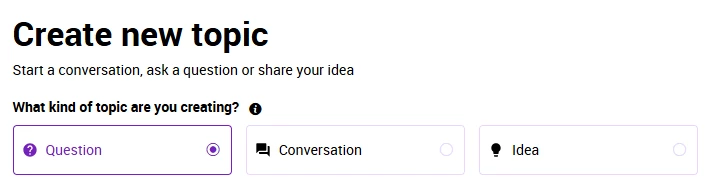
Navigate to the relevant forum board and click New Topic. Add a descriptive title, write your post in the body, and click Submit. Choosing the right board helps other members find and respond to your post.

On the Create new topic screen, select the type of topic to create: a question, conversation, or idea. Description of each topic type can be found below or by hovering over the information icon.
Editing and deleting your posts
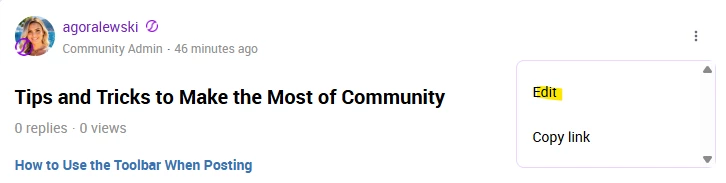
You can edit or delete your own topics and replies at any time. Click the three-dot menu icon on the post and select Edit to make changes, then click Save. Select Delete to remove a post permanently — this also removes all replies within a topic and cannot be undone. If a post has received replies or has been marked as an accepted solution, consider editing rather than deleting.
Likes
Likes are a positive vote on a piece of content. When you find a post helpful or interesting, show your appreciation by clicking the thumbs-up icon below the post. You must be signed in to give likes.
Best Answer
A Best Answer is a way to highlight the reply that best answers a question you have posted. When you mark a reply as an accepted solution, both the question and the solution receive special icons, and a link takes readers directly from the question to the answer. The Best Answer icon also appears on boards and in search results so other members can quickly see which posts have solutions.
To mark a reply as an accepted solution, open your topic and click Best Answer below the helpful reply. You can only mark solutions on topics you have posted. Community moderators can also mark accepted solutions on any topic.

Private messages
Registered community members can exchange private messages with each other. Private messages are not visible to the rest of the community. To send a private message, navigate to another member's profile and select the message option.
Solved Posts
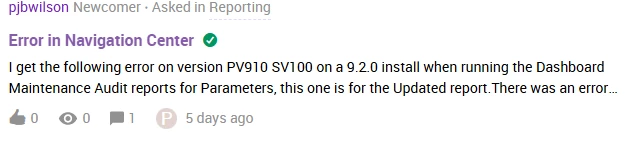
The circle checkmark icon means the thread contains a post that has been marked as a solution to the original question or issue. If you are experiencing the same problem, it is likely that you will find your solution here.
Closed Posts
This means the thread was closed by an Admin, meaning that no new replies can be added. Threads that are closed are purely informational and not intended for conversations.

IdeaStream
IdeaStream is the OneStream Community's collaborative feedback channel for submitting and discussing product ideas. Navigate to IdeaStream from the community menu to browse, vote, and submit ideas.
Before submitting a new idea, search IdeaStream first. If a similar idea already exists, add your vote and a comment rather than creating a duplicate. To submit a new idea, click Create Topic. Ensure you select Idea as the type of topic. Each submission requires three elements:
- Title — A concise, descriptive title that clearly conveys the general picture of your request.
- Description — Describe the problem you need solving, including the situation, your expected outcome, your proposed solution if any, and how you currently work around the issue. Focus on what you are trying to accomplish and why, rather than just describing a solution.
- Label — A label that associates the idea with a OneStream solution area. If unsure, make your best guess.
- Additional guidelines: submit one request per idea (multiple requests in one submission are hard to track and update), write in English where possible so your idea reaches the broadest audience, and do not include private or sensitive information as IdeaStream is visible to all community members.
Voting on ideas
To vote for an idea, click the Upvote button on the idea.

To remove your vote, click the Upvote button again. You may vote on as many ideas as you like. You are also encouraged to comment on ideas with solutions, workarounds, or context on how the idea would impact your organization.
Idea statuses
Each idea is assigned a status. Open ideas (still collecting votes and comments) carry the following statuses:
- New — The idea has just been posted and will be reviewed by a Community Moderator within 3 business days.
- Needs Info — The idea requires more information from the poster. A moderator will reach out for clarification.
- Gathering Interest — The idea is open for voting and comments.
- Under Review — The idea has received enough votes to be considered for the product roadmap.
- Scheduled — The idea has been assigned for delivery in the next 1-2 release cycles.
- Future Consideration — The idea is a high priority but does not yet have a target date.
- Closed ideas are no longer open for voting. Closed statuses include: Delivered (shipped in the product), Duplicate (already submitted by another user), Existing Feature (functionality already exists), Bug (submitted to the development bug backlog), and Closed (does not meet current product strategy or lacks community engagement). Ideas more than 6 months old with fewer than 3 votes are reviewed and closed for lack of engagement.
Reporting content
You can also report posts that are inaccurate, outdated, or no longer valid. As the Community grows and the product evolves, older posts may contain incorrect information. Flagging these helps keep the Community accurate and useful for everyone.
If you come across a post that violates the Code of Conduct — spam, offensive language, personal attacks, or phishing links — click the three-dot menu icon on the post and select Report. Choose a reason, optionally add a note, and submit. Reports are anonymous and reviewed by the moderation team. Reporting is for guideline violations, not content you simply disagree with.
Writing a Blog
If you are interested in contributing a blog post to the OneStream Community, reach out to the Community team at community@onestreamsoftware.com with your topic idea or a rough draft. A member of the team will be in touch to discuss next steps.
Getting Additional Help
For questions or issues that are complex, require more than 10–15 minutes to answer, or involve company-specific details that should not be shared publicly, please submit a support ticket in Service Now rather than posting in the forums. Service Now is also the right place to report login problems or access issues that the Community team cannot resolve directly.