


Member
September 11, 2026
Solved

Cube View Advanced Content Block Not Available for Injection in Genesis 2.1 / OneStream 9.2.1

  • September 11, 2026
  • 8 replies
  • 82 views

Hi All,

I am encountering an issue while trying to inject the Cube View Advanced or any Content Block into a Genesis / Planning Personas page.

The error received is:

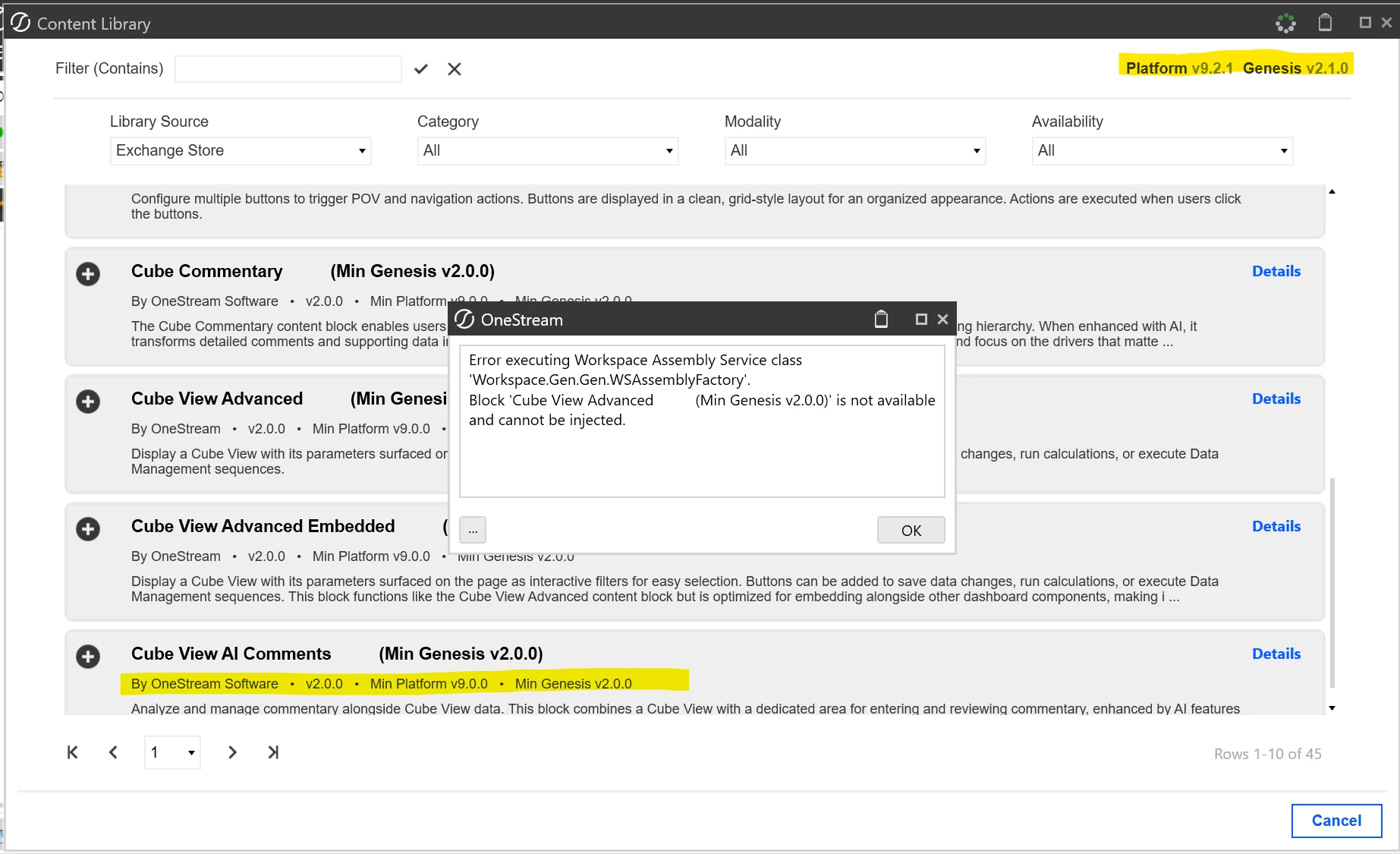
Error executing Workspace Assembly Service class 'Workspace.Gen.Gen.WSAssemblyFactory'.
Block 'Cube View Advanced (Min Genesis v2.0.0)' is not available and cannot be injected.

Our current environment is:

  • OneStream Platform: 9.2.1.18605
  • Genesis Version: PV9.0.0-SV2.1.0
  • Genesis Library Service: Enabled
  • Cube View Advanced requirement: Minimum Genesis v2.0.0

Based on the version requirements, Genesis 2.1 should meet the minimum requirement for Cube View Advanced.

I have also verified that the Genesis Library Service is enabled. The block appears to be available through the Content Library/Exchange Store, but Genesis prevents it from being injected and reports it as not available.

I’m trying to understand why the Cube View Advanced block is showing as unavailable even though our Genesis version meets the minimum requirement.

Has anyone seen this before? Is there any additional setup, access, or installation required before the block can be added to a Genesis page?


Thanks, 
Nitish Krish B
 

Best answer by BGrant

Hello ​@Nitish Krish B 

Update: A fix has been deployed. Block injection in Genesis 2.1.0 via the content library integration is now working as expected. No upgrade is needed on your end. Thank you for your patience while we resolved this.

8 replies

OneStream Employee
September 14, 2026

The screenshot indicates that your environment is running Platform 9.2.1 and Genesis 2.1.0, which satisfies the stated minimum requirement of Genesis 2.0.0 for the Cube View Advanced content block as you mentioned.

The error:

Error executing Workspace Assembly Service class 'Workspace.Gen.Gen.WSAssemblyFactory'
Block 'Cube View Advanced (Min Genesis v2.0.0)' is not available and cannot be injected

typically indicates that the block definition is visible in the Exchange Store catalog, but the underlying Genesis workspace assembly that provides the block is not available or has not been deployed correctly.

Did you updgrade from an earlier Genesis release?

If this environment was recently upgraded, try re-deploying or re-installing the Genesis solution package to ensure all workspace assemblies were registered correctly.

Member
September 15, 2026


Hi ​@JJones ,

Thanks for the response. This does appear to be related to the Genesis upgrade.

I tested the same Cube View Advanced Content Block with the older Genesis 2.0.0 version, and it can be injected successfully.

However, after upgrading to Genesis 2.1.0 on Platform 9.2.1, the Content Block is still visible in the Exchange Store, but injection fails with:

Block 'Cube View Advanced (Min Genesis v2.0.0)' is not available and cannot be injected.

I have attached screenshots showing the behavior in both versions.

Could you please advise on the next troubleshooting step? Is there any additional workspace assembly registration, upgrade step, or configuration required when moving from Genesis 2.0.0 to 2.1.0? I will also log a ticket to OneStream on this regard. Thanks for your input. 

Regards, 
Nitish Krish B

Advisor
September 15, 2026

Hi ​@Nitish Krish B 

I would recommend logging this directly with Support to assist with further investigation

Thanks

Sam

Member
September 15, 2026

Sure, thanks :)