
Newcomer
February 17, 2025
Solved

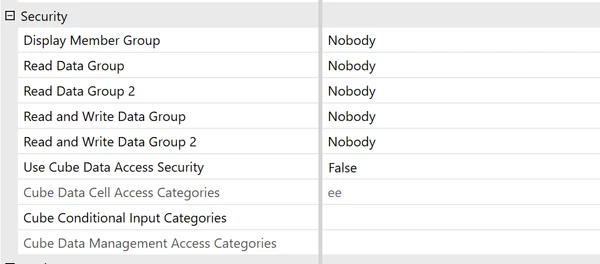
All entity security settings set to "Nobody", yet non-admin user stills sees data for entity

  • February 17, 2025
  • 5 replies
  • 0 views

Hi, I have set all security settings on an entity to "Nobody" and yet when I see a dashboard using a non-admin user I still see data. The same when using a spreadsheet. This does not make sense to me. What am I missing?
 

Best answer by T_Kress

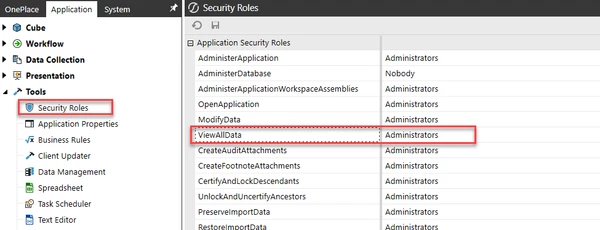
Also, check your application security roles and the "ViewAllData" role.  If this has "Everyone" this group trumps/overrides/supersedes any individual entity security you are trying to apply.  


5 replies

Newcomer
February 17, 2025

What is the source of the data that is surfaced to the Dashboard or Spreadsheet?  Cube Views, Quick Views, GetCell() that get data from the Cube should be honoring the MetaData security.  However, if the data is being surfaced via a let's say a Data Adapter reading from some relational data source, then the data adapter has to replicate the desired security.

LFaiscoAuthor
Newcomer
February 18, 2025

The source for both is the actual cube.

LFaiscoAuthor
Newcomer
February 17, 2025

In the dashboard it's from a simple Cube View; in the spreadsheet it's a quickview querying the cube directly, nothing fancy. As you say, I was hoping metadata security alone would suffice for this, but it seems it's not working as expected.

Newcomer
February 17, 2025

Are you absolutely positive the user is not directly or indirectly a member of the Administrators group?  Administrators trump all OS security.  Take a look at or provide a screen shot of Cell Status for a Cube View value for the Entity in question.

LFaiscoAuthor
Newcomer
February 18, 2025

I can confirm that the user is not directly or indirectly a member of the Administrators group.

Veteran
February 17, 2025

I think you'll need to share more in order to try to troubleshoot. Here are a couple points I'd confirm: 

  1. Can you share the bigger screenshot above showing the entity (looking for the entity name) and also the cell POV from the dashboard/CV? I'd start there - make sure you'll comparing apples to apples and pulling the exact same entity. 
  2. Double check that the user you're logged into in order to pull the dashboard doesn't have Administrators in their security (or nested somehow in security). 


OneStream Employee
February 17, 2025

If the user is an Administrator they can see everything within OneStream.

T_Kress
OneStream Employee
T_KressOneStream EmployeeAnswer
OneStream Employee
February 17, 2025

Also, check your application security roles and the "ViewAllData" role.  If this has "Everyone" this group trumps/overrides/supersedes any individual entity security you are trying to apply.  


LFaiscoAuthor
Newcomer
February 18, 2025

This solved it! ViewAllData was set to a group which was not Administrators but included the user I was testing with. After changing this to a more suitable (restricted) group which does not include the test user, it's working as I wanted.