
Solved
Member Dialog Parameter Type in a Dashboard
Hi everyone,
Quick question re Dashboards.
When you use a parameter in a Cube View there is an option to display the Member Filter using a "Member Dialog" Parameter Type. This shows you the results in a hierarchy that can be expanded or collapsed.
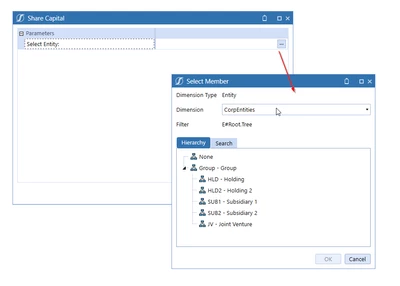
When building an interactive dashboard I need to present the user with a large number of members to select from. The Combo Box option isn't particularly easy to browse through as it simply lists the members (albeit this can be indented with a BR to imply the hierarchichal relationships). Is there a way of replicating the Member Dialog Parameter Type in a Dashboard component?
Regards,
Lee