
OneStream Employee
December 15, 2021

Behaviour between Top Level cube and Cube References

  • December 15, 2021
  • 8 replies
  • 0 views

Dear community,


I have a very simple use case with my base entity set in "finance entities" top level cube, and the group entity set in the "finance group" cube.


Everything in the "finance entities" cube works fine and as expected. However, no data roll out to the top level cube, even though I have tries to consolidate, force consolidate ... 

The 'Cube Refence' has been set so that the dimension for local entities is coming from the "finance entities" cube.


When using a cube view on the Top level cube for base-level entity and group-level entity, I can only see that the cells related to group-level entity are all in red.


--> What am I missing so that data from base level entity can roll-out to parent entity in the top level cube ?


Top Level cube references :

Sergey_0-1639561136627.png

Top level cube entity dimension :

Sergey_3-1639561259237.png

Reference cube entity dimension :

Sergey_4-1639561299954.png

Local Entity dimension:

Sergey_1-1639561180710.png

Group entity dimension :

Sergey_2-1639561217575.png

Many thanks,

8 replies

OneStream Employee
December 15, 2021

Can you share the screenshot of the cube view? You should put the top level cube in pov and the entire entity hierarchy in rows. It should be entirely green if the setup is correct. Also what is the default currency of your entities? Are they set to Is Consolidated = Ture? If they are in different currencies do you  have exchange rates loaded? Are your accounts set to Is Consolidated = True or Conditional (if they don't have a formula)?

SergeyOneStream EmployeeAuthor
OneStream Employee
December 16, 2021

Hi Tommy,


Please find below the cube view :

Sergey_0-1639643525187.png

The setup that you were refering to is correct (Is consolidated = True for both entity & account), the default currency for base entity is PLN, while EUR for parent entity, and I ensured that rates are indeed loaded - but you can see that it converts since first parent entity is converted (it is in the base level cube).


Regards,

OneStream Employee
December 16, 2021

Is the cube view on the base level cube or the top one? You need to use the top level cube and consolidate from there

SergeyOneStream EmployeeAuthor
OneStream Employee
December 16, 2021

Hi,


It is indeed the top level cube in this cube view. The Total goes green if I select base element from the dimensions of this top cube, but consolidation is doing nothing 😞


Sergey_1-1639645564231.png

Regards,

OneStream Employee
December 16, 2021

Why is none in there? Are you on Top of the consolidation dimension as well? When you say "The Total goes green if I select base element from the dimensions of this top cube" which dimensions to you refer to? 

SergeyOneStream EmployeeAuthor
OneStream Employee
December 16, 2021

Ciao,

I was in C#Local, but same with C#Top :


Sergey_0-1639646142002.png


Regards,

OneStream Employee
December 16, 2021

If the cell in invalid it means the cubes are not properly setup. You might have some of the dimensions not assigned properly or something else. Reach out internally, no point discussing basic cube setup here

SergeyOneStream EmployeeAuthor
OneStream Employee
December 20, 2021

Hi,

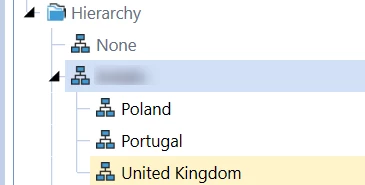
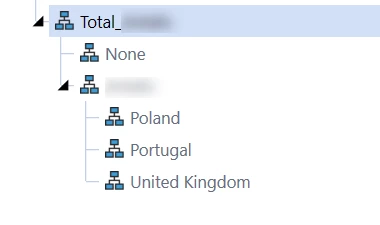
So the issue was actually related to my UD3 dimension, which wasn't making a link between the group dimension, and the entity dimension. Adding a parent to my entity dimension and ensuring that this parent was reflected in the group dimension solved this issue.

We were able to see this issue by using the drill down functionality on the parent cell where we were supposed to see data. Drilling down on UD3 resulted in 0 rows although we knew that there was base level input.


Thank TSANDI for your help 🙂


Regards,